The Per-App Record Pages
Chapter 4: The Per-App Record Pages
app.seameet.ai/record/<app> is a family of 25 app-specific landing pages, each optimised for recording that specific service. Each page shows the same one-click Record & transcribe button, plus a walkthrough tailored to the peculiarities of that app.
The 25 supported sources
| Category | Apps |
|---|---|
| Video conferencing | Zoom, Google Meet, Microsoft Teams, Webex, Whereby, Jitsi Meet |
| Messaging with calls | WhatsApp, LINE, WeChat, Telegram, Signal, Viber, KakaoTalk, Skype, Discord |
| Team chat | Slack (huddles) |
| Live-streaming / video | YouTube, podcasts, Loom, Twitch |
| Generic | Any web page, your screen, your mic, an uploaded file, OBS |
Every page is at app.seameet.ai/record/<app-slug> (e.g. /record/whatsapp, /record/line, /record/wechat, /record/zoom). If your app isn't listed, use the Any web page or Your screen page as a fallback.
What each page shows
Same shape across all 25:
- A big headline — "Record a WhatsApp call" — so the page is unambiguously about that app.
- One-click Record & transcribe button — no extra steps to click through.
- An animated walkthrough of Chrome's share picker — shows exactly which tab or window to pick for this app, and reminds you to keep "Share system audio" on.
- How-to steps — the specific quirks of recording that app (does the desktop app share system audio? Do you need to open the call in a browser tab? etc.).
- An honest "what can be captured" table — per OS and browser, so you know before you start whether your setup will get both sides of the audio.
- FAQ — the two or three questions people actually ask about recording that app.
- A recording-consent reminder — the one-liner about telling the other party you're recording, plus the local legal note.
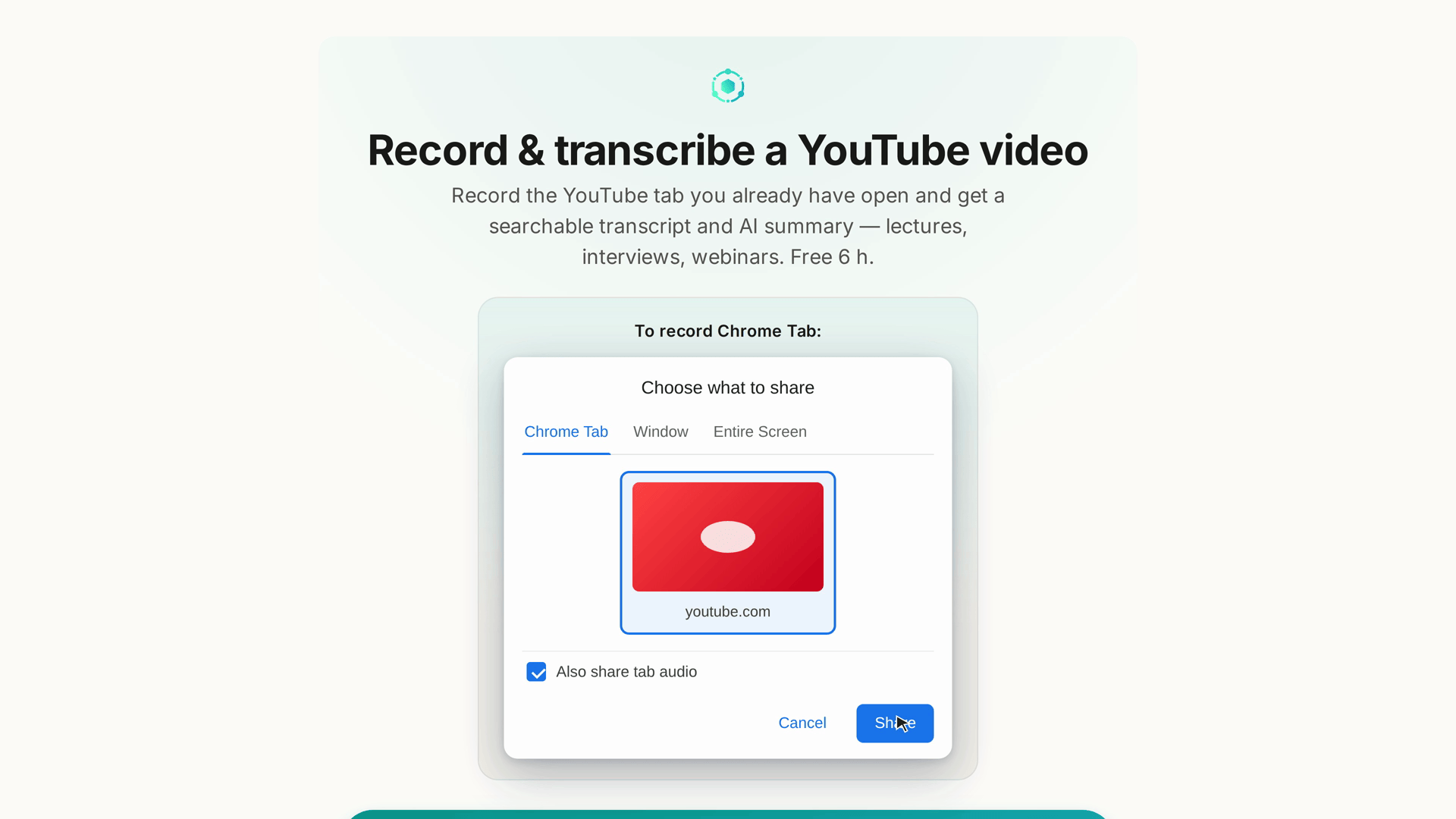
The animated share-picker walkthrough — the load-bearing part
For anyone unfamiliar with Chrome's share picker, it looks like a wall of thumbnails. The walkthrough on each /record/<app> page:
- Shows the picker as an animation, so you know what you're about to see.
- Highlights the right tab or window for that specific app (e.g. for WhatsApp: pick the WhatsApp Web tab, not the desktop app; for Zoom: pick the meeting window, not the Zoom control panel).
- Points at the "Share system audio" checkbox in the picker with a callout, because that's the single most common thing new users forget.
23 languages
Every /record/<app> page also exists at app.seameet.ai/<lang>/record/<app> for all 23 supported languages. The pages are real localised landing pages — hand-translated title, heading, description, steps, FAQ, and consent note — not English content under a foreign URL. Search engines see one localised page per language via hreflang, so a user searching in Chinese for how to record a WhatsApp call finds the Chinese page directly.
Recent behaviour (as of v1.24.2 / v1.25.0):
- Your browser or app language decides the URL. Visit
/record/whatsappwith your browser set to Traditional Chinese and you're redirected to/zh-TW/record/whatsapp. - Marketing links keep their tracking parameters through the redirect.
- If you explicitly picked English, you stay on English — your explicit choice always wins over your browser's default.
- Visiting an English
/record/<app>page does NOT flip your whole app to English. The page keeps its English URL for search engines, but your language preference is unchanged.
The launchpad and the not-found grid
app.seameet.ai/record— the launchpad (see Chapter 3).app.seameet.ai/record/no-app— the "not-found grid" you land on if you visit/record/<something-not-supported>. It shows every supported app as a clickable tile so you can pick one that's close.
Both exist at app.seameet.ai/<lang>/record and app.seameet.ai/<lang>/record/no-app for every supported language.
Extension-primed hand-off
If you have the SeaMeet Chrome Extension installed AND the app you're recording is one the extension supports (Google Meet, Zoom, Teams, etc.), a primed intent hand-off runs: the record page detects the installed extension and offers to start the recording in the extension's side panel instead of the browser recorder. You get the extension experience (side-panel captions and notes, meeting-aware auto-stop) without leaving the record page you were already on.
The hand-off is scoped to apps the extension can actually improve. For apps outside that list, you stay on the browser recorder.
The 60-second demo video
Google Meet's /record/google-meet page (and the extension welcome page at /welcome/extension) carries a 60-second demo video — see the whole flow (record from your own tab, live transcript, AI summary, no bot joining) before you press anything. The video is localised in 9 languages (Spanish, Japanese, French, Korean, Portuguese, Russian, Vietnamese, Traditional Chinese, Simplified Chinese) — you get your language's cut, not the English one.
Other apps' record pages may add localised demo videos over time.
Quick Reference
| Task | Where |
|---|---|
| Record WhatsApp | app.seameet.ai/record/whatsapp |
| Record LINE | app.seameet.ai/record/line |
| Record WeChat | app.seameet.ai/record/wechat |
| Record Telegram | app.seameet.ai/record/telegram |
| Record Zoom | app.seameet.ai/record/zoom |
| Record Meet | app.seameet.ai/record/google-meet |
| Record Teams | app.seameet.ai/record/microsoft-teams |
| Record any web page | app.seameet.ai/record/any-web-page |
| Record your screen | app.seameet.ai/record/your-screen |
| Not sure which page? | app.seameet.ai/record/no-app |
| Force English | Add ?lang=en or visit the un-prefixed URL after picking English in Settings |
Last updated: 2026-08-28
← Chapter 3: The Browser Recorder | Chapter 5: Live Captions and Live Notes →
Published: