The Affiliate Program
Chapter 16: The Affiliate Program
For content creators, YouTubers, podcasters, businesses, and anyone with an audience: the affiliate program is a commission-based version of the referral program. You promote SeaMeet to your audience; when they subscribe via your link or coupon, you earn commission — paid out by PayPal once you clear $50.
How it differs from referrals
- Referral is peer-to-peer: "hey friend, use SeaMeet, we both get a month." Small scale (12 credits/year cap). See Chapter 15.
- Affiliate is commercial: application required, real commission, no cap. Designed for creators and businesses who can send meaningful audience.
The two don't stack on the same conversion — one referral, one commission source. If a user arrives via an affiliate link, that conversion earns the affiliate; the referee's own personal referrer doesn't get a credit on top.
Applying
Account → Affiliate program → Apply. The application asks for:
- Your name (public — this appears on your promotional materials).
- Your primary channel (YouTube, podcast, blog, business site, etc.).
- A short description of your audience.
- Contact info.
- PayPal email for payouts.
Application handling (a v1.22.1 fix): if you type a channel URL without https:// (e.g. youtube.com/@you), the form completes it for you. If the field is still not a link the form says so BEFORE you submit — not with a generic "Something went wrong" like the previous version.
The apply form also names which specific field it's unhappy about on any rejection. Previously every rejection surfaced the same generic error regardless of cause.
What you get after approval
Once approved:
- Your personal affiliate link —
app.seameet.ai/?ref=<your-code>orapp.seameet.ai/pricing?ref=<your-code>etc. - A 10% first-year coupon for your audience — applied automatically at checkout when someone follows your link.
- A commission percentage on qualifying conversions (percentage visible in your dashboard; it's structured so both sides get value — your audience saves, you earn).
- Your affiliate dashboard at
app.seameet.ai/account/affiliate.
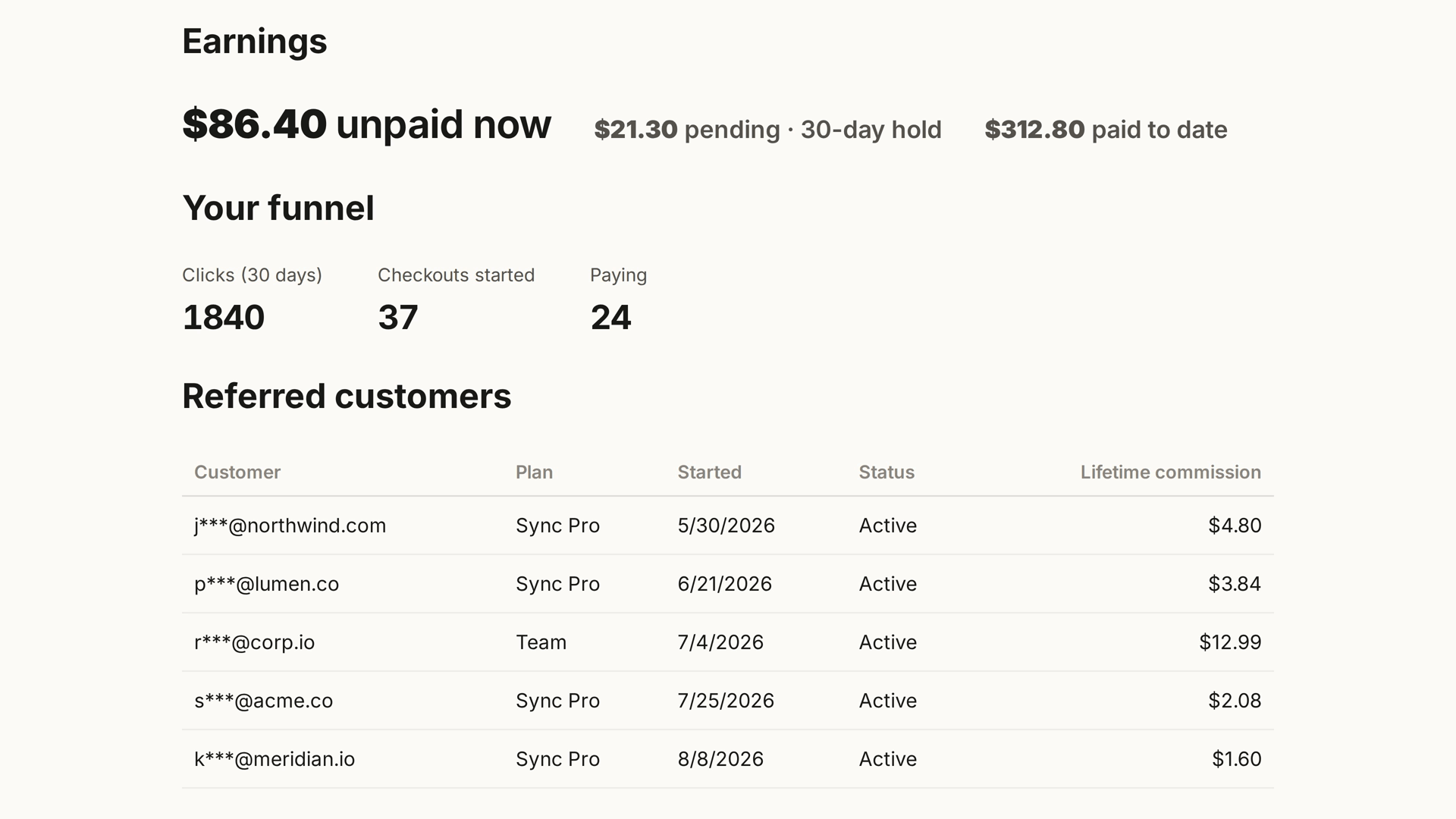
The dashboard — three groups
As of v1.19.0, the dashboard is grouped by what you came to do:
- Share. Your link, coupon code, and downloadable flyer image (see below).
- Performance. Your funnel — clicks, checkouts started, paying, and earnings.
- Payouts. Your PayPal email, upcoming payout amount, next-statement date, and history.
The next-statement notice lives in Payouts (moved there from Share in v1.19), so it's where you'd expect it.
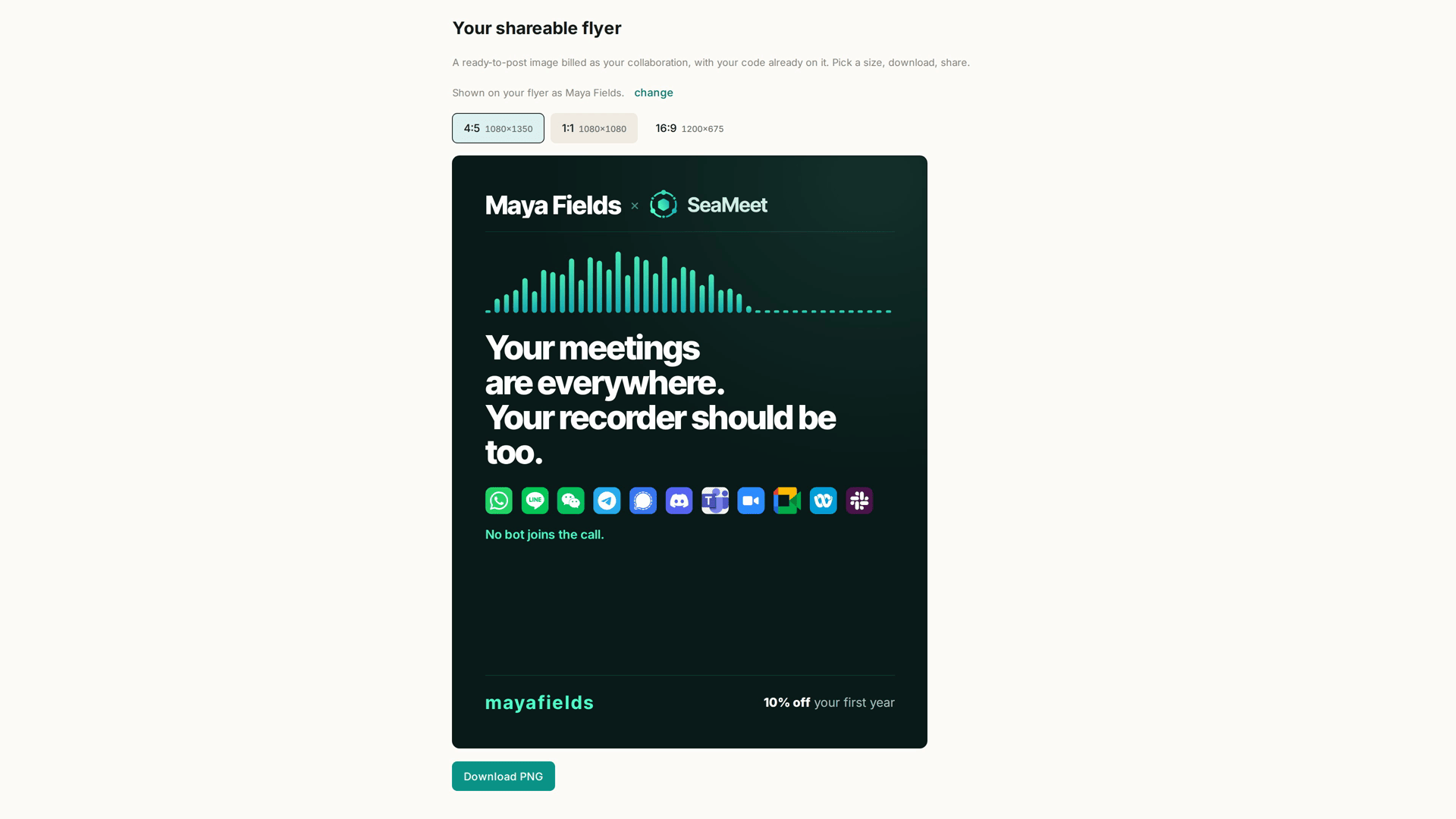
The downloadable flyer
Your affiliate page carries a ready-to-share flyer image billed as your collaboration with SeaMeet. Pick the aspect ratio (4:5, 1:1, or 16:9) and download the PNG.
- The flyer includes your name (matching the name shown in your affiliate profile).
- Preview updates live in the apply form as you complete fields — you can see it before you're approved.
- After approval, the flyer is downloadable from the dashboard's Share group.
- Renaming yourself (see below) updates the flyer.
Renaming yourself — v1.19 also made your public affiliate name freely editable. Prior to that, it was locked to whatever you typed at application. Change it from the dashboard and the flyer follows.
The funnel (with v1.23 corrections)
The dashboard's Performance section shows:
- Clicks — how many times your link has been opened.
- Checkouts started — how many reached Stripe. Previously labelled "Signed up" — v1.23 corrected it because the row behind it is created when someone reaches Stripe, and calling that a signup overstated the funnel in the affiliate's favour (which is the worst direction for a number on your own dashboard to be wrong).
- Paying — how many completed their first payment. Previously labelled "Active" — v1.23 corrected.
Zero-state clarity. As of v1.23:
- With no clicks yet, the funnel says "your link is live and working" instead of three zeros.
- Once clicks appear but before checkouts start, it says that specifically — the zeros have an explanation you can act on.
- The stages always render, even before your first sale — before v1.23 they hid under the empty table, so the affiliate who most needed to see their funnel (the one who just started) was the only one who couldn't.
Payouts
- Threshold: $50 accumulated commission.
- Method: PayPal, to the email you registered on application.
- Cadence: monthly. Below the threshold, unpaid earnings roll to next month.
- History: every payout logged with amount, date, and transaction ID (visible in the dashboard's Payouts group).
Update your PayPal email from the Payouts group at any time. Changes apply to the next payout.
What the commission covers
Sync Pro paid conversions through your link. Concretely:
- The referee's first paid invoice (first month of monthly, or first year of annual) — commission on that.
- Ongoing renewals — commission continues (percentage may differ; see dashboard).
- Team plans count — commission on the team subscription's paid amount.
Doesn't count:
- Free-tier signups.
- Existing Sync Pro subscribers renewing (not attributable to your link if they subscribed before opening it).
- Refunded charges — commission is reversed on refund.
When someone opens your link but doesn't buy
They're a click — always counted. They may return later without the link and still convert; if they do, the conversion is only attributable to you if their attribution cookie survives, or if they enter your affiliate coupon code at checkout. Encourage sharing the coupon code alongside the link for the case where the cookie is lost.
Commission delay
- Click → Checkout started: the click is counted immediately.
- Checkout started → Paying: counted when Stripe confirms payment (seconds to minutes).
- Paying → Commission ledger: commission is recorded on your ledger the same day.
- Commission ledger → PayPal payout: monthly, subject to the $50 threshold.
For a new affiliate, the first payout can take 60-90 days depending on your audience's conversion cadence — commission accrues but doesn't pay out until it clears the threshold.
Common problems
"My application was rejected." Common reasons: channel URL not a real link (see the v1.22.1 fix), audience description too vague, or a duplicate application under a different email. Reapply with clearer info.
"My clicks aren't converting." Check the coupon is actually applied at checkout — some ad blockers strip URL parameters. Encourage your audience to also enter your affiliate code manually.
"Payout didn't arrive." Check your PayPal email is current. Check the payout month's status in the dashboard — if it says "processed" but nothing landed, check PayPal's spam / limbo. Contact support with the payout date if unresolved.
"My flyer name is wrong." Update the name in your affiliate profile → flyer regenerates.
Quick Reference
| Task | Where |
|---|---|
| Apply | Account → Affiliate program → Apply |
| See your dashboard | Account → Affiliate program (after approval) |
| Get your link and coupon | Dashboard → Share |
| Download flyer | Dashboard → Share → aspect ratio → PNG |
| See funnel | Dashboard → Performance |
| Update PayPal email | Dashboard → Payouts |
| Rename yourself (updates flyer) | Dashboard → Profile |
| Escalate a payout issue | Account → Support |
Last updated: 2026-08-28
← Chapter 15: The Referral Program | Chapter 17: Account and Settings →
Published: