The Referral Program
Chapter 15: The Referral Program
Refer a friend, both of you get a month of Sync Pro. Shipped in v1.20.0. This chapter covers how the program works, how to share your link, and what you can expect to see on your side.
How it works, in one paragraph
Go to Account → Refer a friend, copy your personal referral link, share it. When someone follows it and subscribes to Sync Pro — and their first payment clears — both of you get one month of Sync Pro credited to your next invoice. Up to twelve credits in any rolling 365 days per referring account.
Recipients can also enter a referral code at checkout even without following the link — useful for word-of-mouth referrals over text or Slack.
Where to find your link
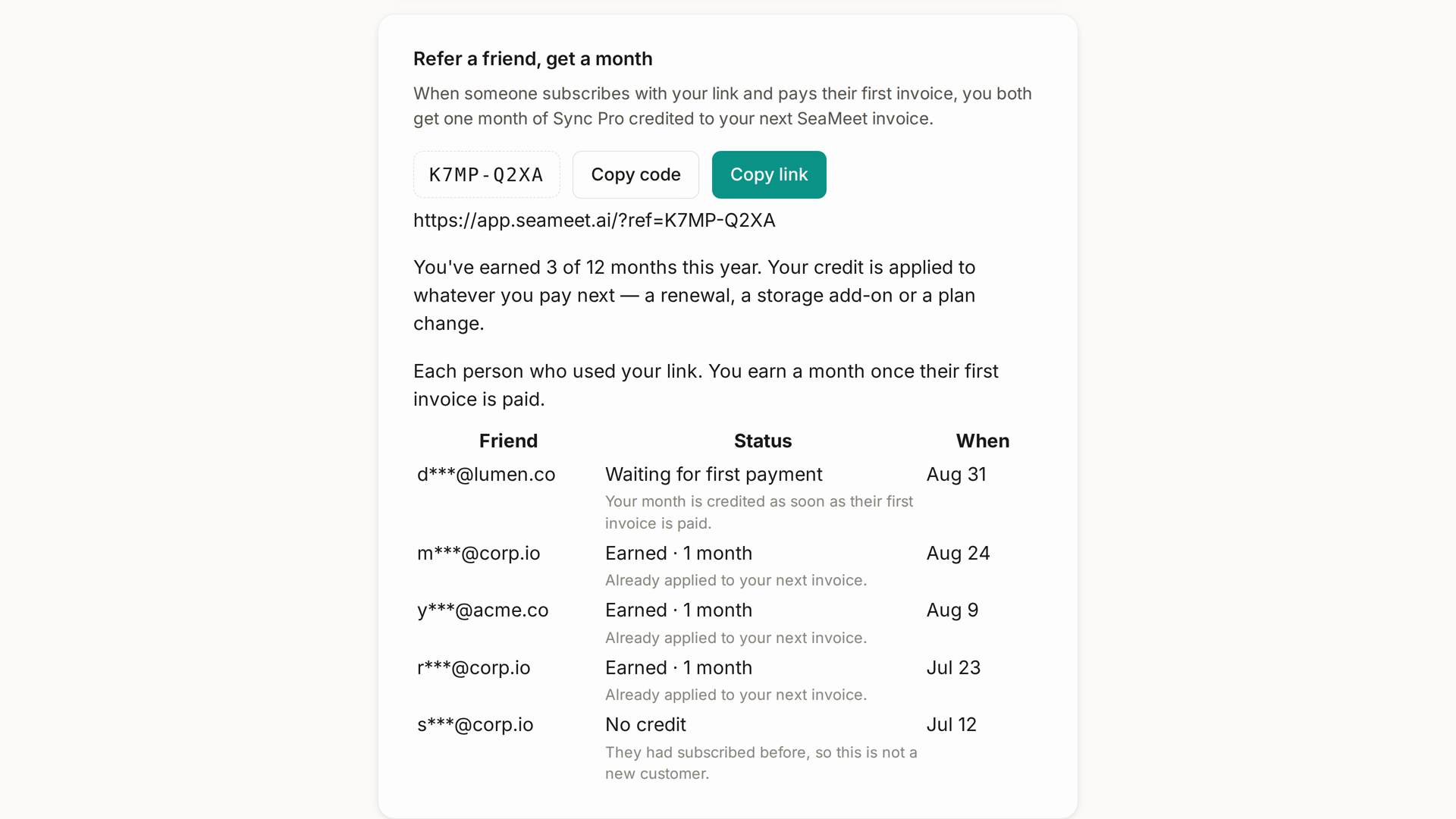
Account → Refer a friend, or app.seameet.ai/account#refer (the anchor drops you at the section). The section shows:
- Your personal referral URL.
- A copy button.
- A referral code you can share as text (equivalent to the URL).
- A history table — everyone who used your link, what happened, and when.
The referee's experience
When someone opens your referral link:
- The page shows a referee banner immediately — "A friend referred you. You'll get a month of Sync Pro credited to your first invoice" (paraphrasing) — before they sign in.
- Once signed in, the banner names the friend (subject to your privacy settings).
- On the pricing page, the Sync Pro card shows the referral discount inline.
- At Stripe checkout, the discount is applied automatically — no code required.
- Dismissing the referee banner does NOT make the pricing page forget the referral (a v1.22.0 fix).
Fix worth naming — v1.22.0: previously, a dismissed banner made pricing forget the referral, and users would then see a checkout without the promised discount. That's fixed.
Attribution — cookies vs verified identity
The referral attribution flows in two layers:
- First-touch cookie — a browser cookie set when someone opens your link. Survives across pages and closed tabs (within cookie expiry).
- Server-side link — when the referee signs up or signs in and pays, the referral is bound to their account. This is when the credit fires.
If a referee opens your link but signs up in a different browser or device without the cookie, the referral is lost. Encourage them to sign up in the same session as the click, or share a referral code (in addition to the link) that they can paste at checkout as a fallback.
Guest privacy on referrals (a v1.22 fix): a guest session opening a referral link no longer reads back the referrer's real name — the "shared by" attribution only reveals after sign-in and verification. Prior to the fix, an anonymous viewer could see the referrer's name; that leak is closed.
Your referral history
The referral section lists everyone who used your link, one row each — friend, status, when. Friend emails are masked. A status is one of:
- Waiting for first payment — they subscribed through your link. The credit fires when their first invoice clears.
- Earned · 1 month — their first invoice was paid, and you both have a month.
- No credit — with the reason in plain words, most often an account that had already paid for Sync Pro.
- Credit returned — a refund, a dispute, or they joined your team within 30 days.
There is no click counter and no funnel: a row appears when someone subscribes through your link, not when they open it. Before that the table is hidden and the section reads "No referrals yet — share your link to start."
The twelve-a-year cap
You can earn up to twelve credit months in any rolling 365 days. Past the cap a referral is still attributed, but neither side earns — not you and not your friend — until an older credit ages out of the window, and the section shows the date that happens. It is a rolling window, so nothing resets on January 1.
This is deliberate: the program is calibrated for personal word-of-mouth referrals, not commercial scale. For commercial promotion, see the affiliate program instead.
When the credit fires
Precisely at the point the referee's first Stripe invoice clears — usually seconds after their card is charged. The credit lands on your next invoice as a line item, not as an immediate refund. You'll see it in your Stripe Customer Portal invoice history after the fact.
If the referee's first payment fails during Stripe's retry window, no credit yet — the credit only fires on a successful payment.
If the referee cancels within their first 30 days, the credit still stands (it fired on the first successful payment, and Stripe's refund policy on cancellations is your normal one).
What friends see at each step
- Land on link: referee banner + friend-name-if-known.
- Sign up: invited state persists; account is created normally.
- Reach pricing: the Sync Pro card shows "Referred by ✓ — you both get a month of Sync Pro after your first invoice is paid".
- At Stripe: they pay the normal price. There is no referral coupon and no discounted first month.
- After first payment: confirmation email says the credit is banked; you both earn.
What if a referee already had SeaMeet?
- Existing free-tier account. Your referral works normally — their first Sync Pro subscription counts.
- Existing (or lapsed) paid Sync Pro account. Referrals only count for first-time Sync Pro paid conversions. A "come back" resubscribe doesn't earn either party a credit. This is a v1.22.0 fix — previously, first-time-buyer discounts sometimes appeared for people who had subscribed before and couldn't use them; now the checkout correctly excludes them.
Common problems
"I shared my link but nobody appears in my history." A row appears when someone subscribes through your link, not when they click it — clicks are not counted anywhere. If someone did subscribe and is still missing, check they didn't have an ad blocker or a "block cross-site cookies" setting that dropped the attribution cookie, or ask them to paste your referral code at checkout instead.
"They paid but I didn't get credit." Check your account is under the twelve-per-365-days cap. Check that they signed up in the same session as the click (or used your referral code at checkout). If neither of those, contact support with both accounts' emails.
"The friend name shows 'Anonymous' or is missing." Their privacy setting hides their name from referrers. Not a bug.
Quick Reference
| Task | How |
|---|---|
| Find your referral link | Account → Refer a friend |
| Share the referral code (fallback) | Account → Refer a friend → Copy code |
| See who used your link | Account → Refer a friend → history table |
| See earned credits | Stripe Customer Portal → invoices |
| Cap | 12 credit months in any rolling 365 days |
| Escalate a missing credit | Account → Support |
Last updated: 2026-08-28
← Chapter 14: Sync Pro Plans and Billing | Chapter 16: The Affiliate Program →
Last updated: