The Wiki - Your Notes, Reduced Into a Knowledge Base
Chapter 39: The Wiki — Your Notes, Reduced Into a Knowledge Base
You have three hundred notes. Somewhere in them is everything you know about Acme Corp — the pricing conversation in March, the escalation in June, the name of the person who actually signs the contract. It is all written down, and none of it is in one place.
The wiki is SeaMeet's answer to that. It reads every note in your workspace, works out which people, organizations and topics keep coming up, and writes one page per subject: everything the corpus knows about Acme Corp, on the Acme Corp page, with a link back to each note it came from. You do not file anything. You do not tag anything. You keep taking notes the way you already do, and the wiki keeps up.
This chapter covers what the wiki is, how to build it, how to read a page, how it maintains itself, and — the part that matters most once you rely on it — how to tell it when it is wrong.
What the Wiki Actually Is
Open your workspace folder in Finder or Explorer and you will find a directory called _wiki/. That is the whole thing. Inside it:
<your workspace>/
├── Meeting · Jun 4.md          ← your notes live at the top level
├── Q2 Reviews/
│   └── Acme Q2.md
└── _wiki/                       ← the generated knowledge base
    ├── index.md                 ← master index of every page
    ├── log.md                   ← what changed, and when
    ├── entities/                ← organizations, projects, clients
    │   └── acme-corp.md
    ├── people/                  ← the people you meet
    │   └── alice-cheng.md
    ├── topics/                  ← themes that cross many meetings
    │   └── pricing.md
    ├── meetings/                ← one page per recorded meeting
    └── .state/                  ← the machinery (see below)
Every page is a plain Markdown file with YAML frontmatter. Nothing is locked in a database. If you delete SeaMeet tomorrow, the wiki is still a folder of Markdown you can open in any editor, publish with any static site generator, or grep from a terminal.
Why the folder starts with an underscore. _wiki/ is hidden from the Notes tree on purpose — the same way .git and .obsidian are. It is generated output, and mixing it into the notes tree would double every entity in your search results. You browse it from the Wiki tab instead.
Why the folders are named one thing and shown as another. On disk the buckets are entities, people and topics. In the app they are labelled Organizations, People and Topics. SeaMeet works out those labels by looking at your actual corpus and writes them to _wiki/.state/sections.json — a doctor's workspace ends up with Patients where a salesperson's has Accounts. The storage names never change, so a wiki built on one machine still reads correctly on another.
Opening the Wiki
Click Wiki in the top navigation, in the Knowledge group beside Notes. The view has the same shape as Notes: a tree on the left, a page in the middle.
If you have never built a wiki, the middle pane shows an onboarding card with two buttons — Take a Note and Start Recording — because a wiki with no sources has nothing to say. Once pages exist, the middle pane becomes Wiki Home: a search box, a stats line, Top of mind (the subjects with the most sources behind them), and Updated this week.
The sidebar collapses with the « chevron and remembers the choice between sessions, same as Notes.
Building It From a Folder of Notes
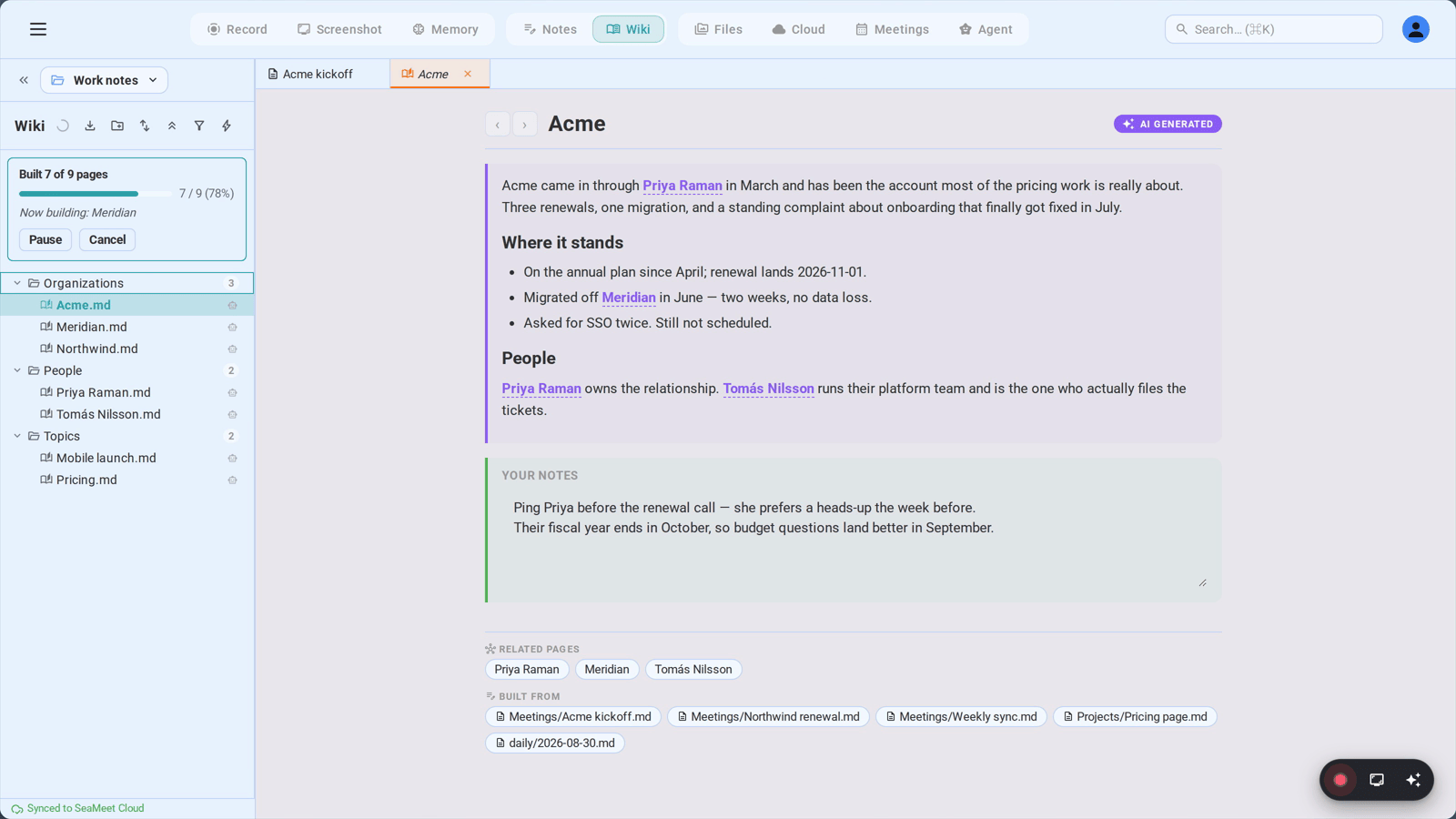
The ✨ button at the top of the wiki tree is Build wiki from all notes. One click and SeaMeet walks your entire workspace, reads every note, and writes a page for every subject it finds. The same button also sits in the Notes tree toolbar, so you never have to switch views to start a build.
It is incremental, not a rebuild
This is the part worth internalizing: the build only pays for what changed. Before SeaMeet sends a note to the AI it hashes the note's body and compares it against the hash from the last build. Identical? Skipped — no AI call, no cost. Changed by only a handful of characters? Also skipped, because there is a delta threshold below which a re-read is not worth it.
So the honest mental model of the ✨ button is not "rebuild the wiki." It is "catch up." Pressing it on a 300-note workspace where you have edited four notes since yesterday reads four notes and rewrites the pages those four notes touch. Everything else stays exactly as it was, including anything you wrote yourself.
What the banner is telling you
While the build runs, a progress banner sits under the toolbar. It moves through two stages:
| Stage | What it says | What is happening |
|---|---|---|
| Read | Read 34 of 210 notes · 118 reused from cache | Each note is being read and catalogued — who and what it mentions. The "reused from cache" count is the hash short-circuit doing its job. |
| Build | Built 12 of 47 pages · 1 failed | Each subject is being written into a page from every note that mentions it. This is where the pages appear in the tree beneath. |
Under the counter the banner names the file it is on right now (Now reading: Acme Q2.md) and keeps a short rolling list of what it just finished, each with a ✓ or a ⚠. If the AI provider makes SeaMeet wait out a rate limit, a small rate limit: 41s chip appears rather than the banner just freezing.
Pause, cancel, resume
Two buttons live in the banner while it runs:
- Pause — stops after the current item. Turns into Continue, which picks up exactly where it stopped. Use this when you want your bandwidth or your laptop fan back for twenty minutes.
- Cancel — finishes the item in flight (so nothing is left half-written) and stops. The banner reads Cancelling — finishing the current note… while it winds down.
A cancelled run leaves a bookmark. Next time you open the Wiki view the banner says A previous wiki build was interrupted at 88/210. Resume? with Resume, Restart and Dismiss. The same thing happens if your AI provider's daily quota runs out mid-run: SeaMeet saves your place, tells you what stopped it, and offers Resume for after the quota resets.
When a run finishes cleanly the banner becomes a one-line summary — Wiki built — 210 notes, 47 pages — with Dismiss and Restart.
The nudge
You do not have to remember to build. Drop ten or more notes into your workspace at once — an import, a sync pull, a folder you dragged in — and SeaMeet raises a toast: 14 new notes since last build, with a Build wiki button. Dismiss the toast and it becomes a quiet banner inside the Wiki view that waits until you act.
Reading a Page
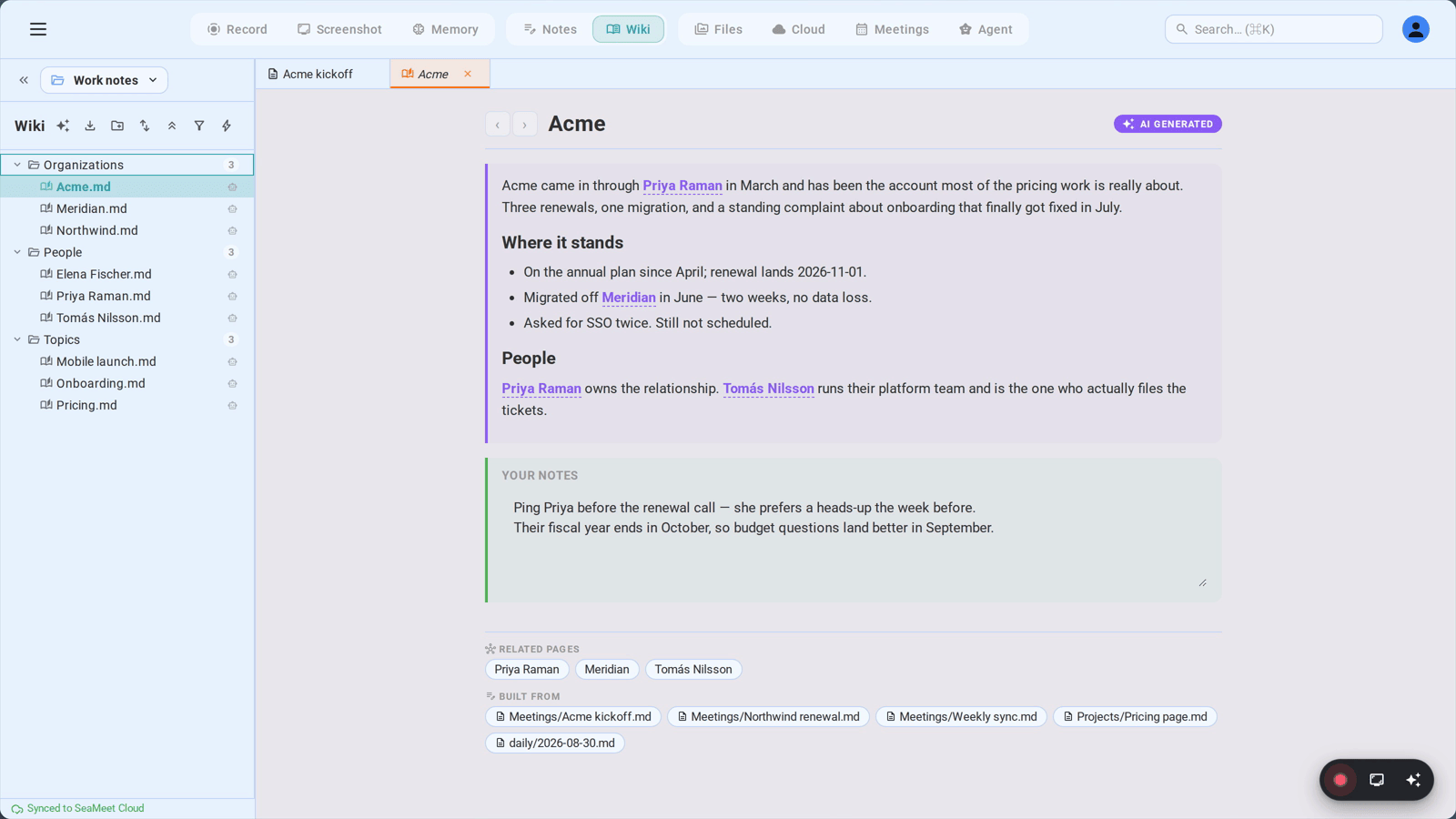
A wiki page has a header, two body regions, and a footer.
The header carries back and forward arrows — the wiki keeps its own navigation history, so following links and coming back works the way a browser does — the page title, and a purple AI Generated pill. Hover the pill and it turns into Refresh from sources: a per-page rebuild that re-reads just this page's sources and rewrites just this page.
The AI section is the top region, marked with a purple left border. This is what SeaMeet wrote. It is read-only in the app, and for a well-sourced subject it is organized into subsections — Overview, Facts, Recent activity, References — with atomic bulleted facts and prose where a narrative is warranted.
Two things inside it are clickable:
[[wikilinks]]— cross-references to other wiki pages, written as[[entities/acme-corp]]or[[people/alice-cheng]]. Click one and you jump there without leaving the Wiki view. SeaMeet only emits a link when the target page actually exists; a name with no page yet stays plain text rather than becoming a dead link.- Inline source citations —
[source: acme-q2.md]after a fact. Click it and the note that produced the fact opens. Where several notes support one statement they are grouped in a single bracket.
Occasionally a fact will be prefixed ⚠️ Conflicting: with both versions presented. That happens when two of your notes say different things and SeaMeet declines to pick a winner. It is a writing instruction, not a verification pass — SeaMeet is not auditing your notes for contradictions, it is refusing to silently flatten one it happened to trip over.
The user section is the bottom region, with a teal left border. It is a plain text box, it is yours, and it auto-saves about a second after you stop typing. More on it below.
The footer has two groups of chips:
- Related pages — the
[[wikilinks]]found in the AI section. - Built from — every note this page was written from, read out of the page's
updatedFromfrontmatter. Click a chip and that note opens in the Notes view. This is the row that makes the page trustworthy: not "the AI says Acme is renewing in Q4" but "these six notes say so, and here they are."
It regenerates; it does not revise
When a subject's page is rebuilt, SeaMeet does not read the old page and edit it. It gathers every snippet about that subject from every note in the catalog and writes the AI section again from scratch, replacing the previous one wholesale.
That is deliberate, and it is the difference between a wiki and a pile of appended updates. A page patched note-by-note would carry forward every stale sentence nobody thought to remove, and would only ever know about the most recent meeting. A page regenerated from the whole catalog knows about all forty-seven meetings at once, drops what is no longer true, and resolves "Alice", "A. Cheng" and "Alice Cheng" into one person.
The practical consequence: do not edit the AI section expecting your edit to survive. It will be overwritten on the next rebuild. Anything you want to keep goes in the user section, or gets fed back in as a correction — both covered below.
Keeping Up By Itself
You will rarely press ✨ after the first build, because the wiki maintains itself as you work.
When you type in a note, SeaMeet waits two minutes after you stop, then decides whether the edit was worth reacting to. It was, if any of these is true:
- you added roughly 150 characters or more since the last time this note fired,
- you added a new
[[wikilink]], or - you added a new heading.
Otherwise nothing happens. Fixing a typo, deleting a stray line, reformatting a bullet — none of that fires an update. Think "every note you add", not "every keystroke": the materiality test exists precisely so that ordinary fiddling does not burn AI calls. There is also a ten-minute cooldown per note, so a long writing session on one note produces a handful of updates, not a hundred.
When a note is read, the subjects it mentions are flagged as needing a rewrite. Rather than rewriting each one immediately, SeaMeet waits thirty seconds and collects everything that arrives in that window into a single sweep. Import twenty notes and you get one sweep over the affected subjects, not twenty overlapping ones.
When a recording finishes, its transcript and AI summary go through the same path — the meeting becomes a source like any note, and the people and topics discussed in it flow into their pages.
From the Notes tree, right-click any note and pick Update wiki from this note to skip the wait entirely for that one note.
One Workspace, One Wiki
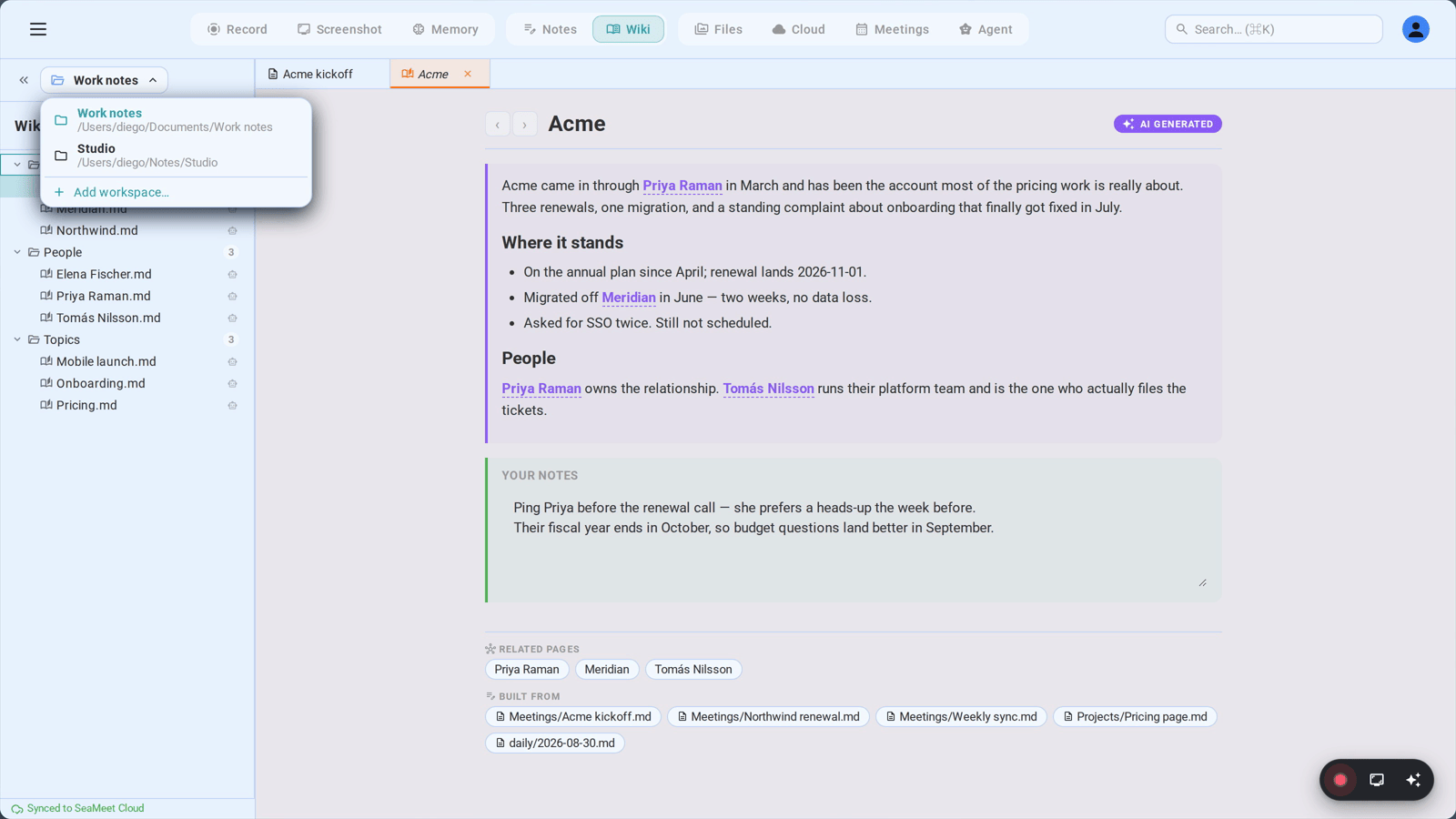
A workspace in SeaMeet is a folder on disk (Chapter 13). The wiki lives inside that folder, at <workspace>/_wiki/. That one fact settles every question about how the two interact.
Switch workspaces from the switcher at the top of the tree and the notes tree, the wiki tree, the search index and the wiki all re-root together onto the new folder. Your work wiki and your side-project wiki do not share an index, do not cross-link, and cannot leak a client name into a page about your weekend project. There is no setting for this and nothing to configure — it falls out of where the folder is.
The switch is serialized: if one is already in flight the next waits for it to finish, so a fast double-click can never leave the notes pointing at one folder and the wiki at another.
One exception worth knowing. Pages generated from recordings are pinned to your default workspace, so a meeting recorded while you were browsing a side-project workspace still lands in the wiki that owns your meetings.
Correcting It
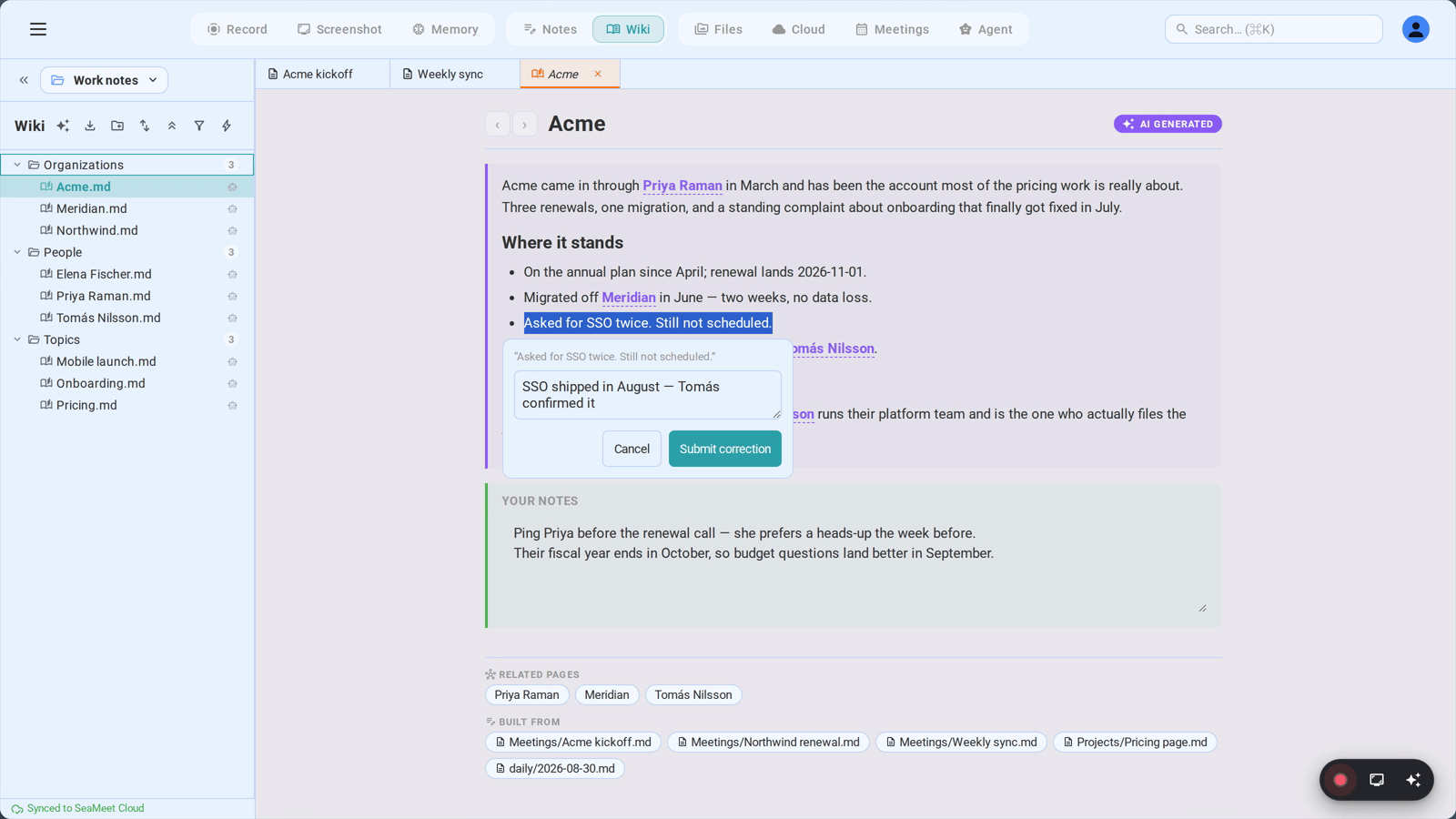
Eventually a page will say something wrong. Someone's title is out of date, two companies with similar names got merged, a decision was recorded as final when it was provisional.
There is no Edit button, because an edit to the AI section would not survive the next rebuild. Instead: select the wrong text. A popover appears the moment you release the mouse over the AI section, showing the sentence you highlighted and a box asking What's right? Type the correction and press Ctrl+Enter (or Cmd+Enter). Esc closes it if you selected the text for some other reason.
Two things happen next.
The correction is stored as ground truth. Signed in, it goes to your account so it follows you to every device. Working offline or with your own API key, it goes to _wiki/.state/corrections.json beside the wiki. Either way it is not a patch applied to the current page — it is a standing instruction that rides along with every future rewrite of that page. Rebuild the page a year from now from an entirely different set of notes and your correction is still there, still authoritative.
The page jumps the queue. Corrected subjects sort to the front of the next rewrite sweep, ahead of everything waiting on ordinary edits. Under the AI section a line appears — Corrected by you — rewrite pending — which is your receipt that the correction landed and the rewrite is coming.
The two regions, and what the AI never touches
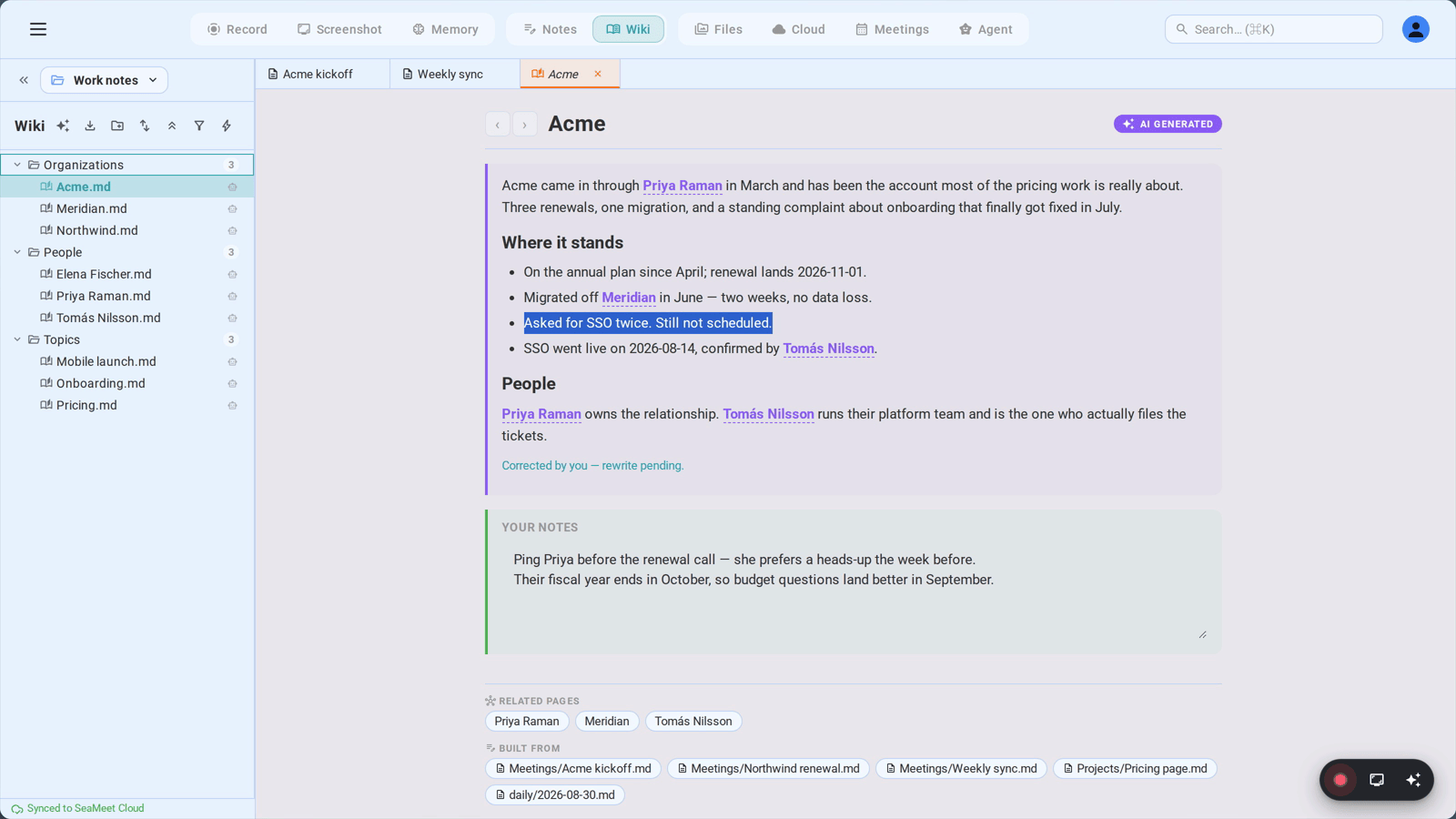
Under the AI section is your section, teal-bordered, a plain box you can type in. This is where the things SeaMeet cannot know go: the reason a deal actually stalled, the fact that someone prefers to be called by their middle name, a link to the shared drive, your own read on a situation.
SeaMeet writes only between the AI markers and reads only between the user markers. A rebuild replaces the whole AI section and does not touch a character below it. That boundary is enforced in the file itself — each region is delimited by HTML comments — so it holds even if you edit the file in another editor, sync it through GitHub, or restore it from a backup.
The division of labour that results:
| AI section | Your section | |
|---|---|---|
| Who writes it | SeaMeet, from your notes | You |
| Survives a rebuild | No — replaced wholesale | Yes — never touched |
| How you change it | Submit a correction | Just type |
| What belongs there | What the corpus says | What only you know |
Finding Things
- Filter the tree — the funnel icon in the toolbar filters page names as you type.
- Quick Open —
Ctrl+P/Cmd+Popens a palette across notes and wiki pages, grouped by kind, with an open-book icon marking the wiki hits. - Global Search —
Ctrl+K/Cmd+Ksearches full text across notes, wiki pages, transcripts, summaries and screenshot OCR. Wiki hits open in the Wiki view. - Wikilinks from a note — type
[[in any note and the picker offers wiki pages alongside notes, suffixed· wiki. - Find on a page —
Ctrl+F/Cmd+Fsearches both regions of the open page and tells you where the hits are: 3 in note + 2 in AI section. Replace is offered only in your section, since replacing text in the AI section would be undone on the next rebuild.
Exporting
The download icon in the toolbar exports the whole wiki as a self-contained HTML site, a PDF, or both, with an option to include the source notes. Useful for handing a client a snapshot, archiving a project at its close, or reading the whole thing on a plane.
What Needs a Subscription
The wiki's AI work — reading notes and writing pages — runs on a paid AI allowance, either a SeaMeet subscription or your own API key (Chapter 35 and Chapter 36). Concretely:
- Reading and browsing existing wiki pages is always available. Pages already on disk stay readable, searchable and linkable whether or not you are subscribed. So does your section — you can keep writing in it.
- Building and refreshing require an allowance. Without one the ✨ button shows a lock chip, automatic updates do not fire, and the background sweep does not run. Nothing is deleted and nothing degrades; the wiki simply stops learning until an allowance is available again.
The Wiki View Layout
┌──────────────────────────────────────────────────────────────────────┐
│  [Record] [Screenshot] [Memory] │ [Notes] [Wiki ●] │ [Files] [Cloud]  │ ← Top nav
├────────────────────────┬─────────────────────────────────────────────┤
│ «  Work ▼           ⚙ │  ‹  ›   Acme Corp            [✨ AI Generated]│
├────────────────────────┤                                             │
│ Wiki   ✨ ⤓ 📁 ⇅ ⌄ ⏷ ⚡│  ┃ Overview                                  │
├────────────────────────┤  ┃ Acme Corp is a logistics customer since  │
│ ┌────────────────────┐ │  ┃ 2024, currently in a Q4 renewal cycle.   │
│ │ Read 34 of 210     │ │  ┃                                          │
│ │ notes · 118 reused │ │  ┃ Facts                                    │
│ │ ▰▰▰▰▱▱▱▱▱▱  16%    │ │  ┃ • Renewal owner is [[people/alice-cheng]]│
│ │ Now reading:       │ │  ┃   [source: acme-q2.md]                   │
│ │ Acme Q2.md         │ │  ┃ • ⚠️ Conflicting: seat count recorded as │
│ │ ✓ Beta Q2.md       │ │  ┃   40 and 55 in different meetings        │
│ │ [Pause]  [Cancel]  │ │  ┗━ purple border = written by SeaMeet      │
│ └────────────────────┘ │                                             │
│ ▼ Organizations     12 │  ┃ Your notes                               │
│    📄 Acme Corp     ←──│  ┃ Alice is on leave until the 20th; go     │
│    📄 Beta Logistics   │  ┃ through Dan for anything urgent.         │
│ ▼ People            31 │  ┗━ teal border = yours, never overwritten  │
│    📄 Alice Cheng      │                                             │
│ ▼ Topics             4 │  ─────────────────────────────────────────  │
│    📄 Pricing          │  🔗 Related pages   [alice-cheng] [pricing] │
│ ▶ Meetings          88 │  📝 Built from      [Acme Q2.md] [Jun 4.md] │
├────────────────────────┤                          ↑                  │
│ ☁ Synced 30s ago      │              every note this page came from │
└────────────────────────┴─────────────────────────────────────────────┘
Troubleshooting
"I clicked ✨ and almost nothing happened"
That is usually correct behaviour. The build is incremental — if nothing has changed since the last run there is nothing to read and nothing to rewrite, and the banner finishes almost immediately with a high "reused from cache" count. To force a single page to be rewritten anyway, open it and hover the AI Generated pill to get Refresh from sources.
If the button showed a lock instead of a spinner, the AI allowance is the problem, not the notes — see Chapter 35: Subscription & Billing.
"A page says something that is wrong, and I keep fixing it"
You are probably editing the AI section, which is replaced on every rebuild. Select the wrong sentence instead and use the correction popover — that persists across rebuilds and is treated as authoritative. Anything that is your own knowledge rather than a fix to SeaMeet's reading belongs in the teal section below, which is never overwritten.
"The page hasn't updated since I edited the note"
Three timers stand between typing and a rewrite, all of them deliberate: two minutes of quiet after you stop typing, a materiality check (about 150 new characters, or a new wikilink, or a new heading), and a ten-minute-per-note cooldown. A small edit legitimately fires nothing at all. To force it: right-click the note → Update wiki from this note, or open the wiki page and use Refresh from sources.
"The build stopped partway with an error"
Almost always the daily quota on your AI provider. The banner will say so and will have saved your position — come back after the quota resets and press Resume. It picks up where it stopped rather than starting over.
"I switched workspaces and my wiki is empty"
That is by design: each workspace has its own _wiki/ folder. The pages you are looking for are still in the other workspace — switch back with the workspace switcher at the top of the tree. A new workspace starts with an empty wiki until you build one.
"A page I expected doesn't exist"
A subject only gets a page once your notes actually say something about it. A name mentioned once in passing stays plain text rather than becoming a link to an empty page. Write a note that says something substantive about it, then let the update fire or force it from the context menu. You can also right-click an unresolved wikilink pill in a note and pick Sync wiki to generate this page.
Quick Reference
| Action | How |
|---|---|
| Open the Wiki | Click Wiki in the top nav |
| Build from all notes | Click ✨ in the wiki (or notes) tree toolbar |
| Pause / resume a build | Pause / Continue in the progress banner |
| Stop a build | Cancel — resume later from the banner |
| Rebuild one page | Hover the AI Generated pill → Refresh from sources |
| Update from one note | Right-click the note → Update wiki from this note |
| Correct a wrong sentence | Select it in the AI section → type the fix → Ctrl+Enter |
| Add your own knowledge | Type in the teal Your notes section — it auto-saves |
| See where a page came from | The Built from chips in the page footer |
| Jump to a linked page | Click a [[wikilink]] in the AI section |
| Go back / forward | The ‹ and › arrows in the page header |
| Quick open a page | Ctrl+P / Cmd+P |
| Search everything | Ctrl+K / Cmd+K |
| Find on this page | Ctrl+F / Cmd+F |
| Filter the tree | The funnel icon in the toolbar |
| Export the wiki | The download icon in the toolbar → HTML / PDF / both |
| Switch to another wiki | Switch workspaces at the top of the tree |
| Find the files on disk | <your workspace>/_wiki/ |
The short version: your notes stay the source of truth, the wiki is a view of them that is regenerated rather than patched, and the two levers you have over it are corrections (which change what SeaMeet writes) and your own section (which SeaMeet never writes). Keep taking notes; the index takes care of itself.
Last updated: 2026-09-02
← Chapter 38: GitHub Sync Setup | (end of manual — return to Index)
Published: