Welcome to the SeaMeet Chrome Extension
Chapter 1: Welcome to the SeaMeet Chrome Extension
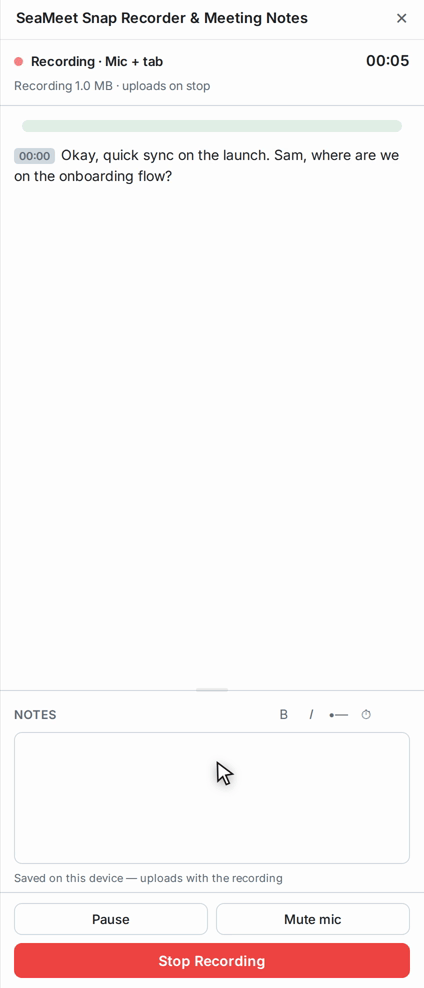
The SeaMeet Chrome Extension is a browser-only meeting recorder. Open Chrome's side panel, press one button, and SeaMeet captures the current tab's audio and video alongside live captions. When the meeting ends, the recording uploads to your library at app.seameet.ai.
There is nothing to install on your operating system, no window to leave open on your desktop, and no permission dialog to click through every time you record.
What it does
- One-click recording of whatever meeting is open in the current tab — Google Meet, Zoom Web, Microsoft Teams (web), Webex, Whereby, Jitsi, and 15+ other browser-based meeting platforms.
- Meeting-aware auto-detection for Google Meet — the extension recognises when you've joined a call and offers to start recording without asking you to choose a tab.
- Live captions during the recording via SeaMeet's live speech-to-text service, streamed straight into the side panel.
- Live notes — signed-in users can type notes in the side panel while recording; the notes upload with the audio and become part of the AI summary.
- Recovery for interrupted recordings — if Chrome kills the extension mid-call (memory pressure, tab closed, browser crash), the recording is durably staged in the browser's local storage and appears in a "saved on this device" list ready to retry the upload.
- Recent meetings deep-link — the last 5 uploads from this browser profile appear as clickable rows that jump straight into the web app.
What it does not do
The extension is a recorder, not a full recording studio. If you need any of these, use the Desktop App instead:
- Flashback (the "record the last 30 seconds retroactively" time-machine buffer).
- Auto-Detection across 47+ meeting apps using OS-level per-app audio monitoring — desktop-only, since browsers cannot see other apps' audio.
- Region, window, or fullscreen recording of anything outside the current Chrome tab.
- Local-only recording as a default — the extension is designed for cloud upload; the desktop app keeps files on your disk by default.
- Global keyboard shortcuts while you're in a different app entirely.
- Notes with wikilinks, slash menu, and a full Tiptap editor — the extension's notes are a simpler markdown panel.
Which meeting platforms are supported
The extension always works on Google Meet and can record any tab that plays audio via the browser's tab-capture API. Content-script integration (which enables meeting-aware auto-start and better titles) is available via optional host permissions for these platforms:
Zoom, Microsoft Teams (Work & Live), Webex, Whereby, Jitsi Meet, 8x8, BigBlueButton, GoTo Meeting, Lark / Larksuite, Tencent Meeting, VooV Meeting, Zoho Meeting, Element Call, Livestorm, ClickMeeting.
You grant these permissions per platform, only when you use them. See Chapter 3: Recording a Meeting for how.
What you'll need
- Google Chrome (recent version) or a Chromium-based browser that supports Manifest V3 side panels.
- A microphone (built-in laptop mic is fine).
- A SeaMeet account — free tier is enough to get started, and you can also record anonymously and sign in later.
Last updated: 2026-08-27
Published: