Customer Meeting Notes That Write Client Pages
Table of Contents
Before the fifth call with the same client, every seller runs the same ritual. Dig up the last thread in the email archive. Skim three meeting notes with dates for filenames. Ask the colleague who was in the April call — if she is still at the company. Reconstruct, from fragments, what you already spent four conversations learning: what they promised, what they pushed back on, which number made them hesitate. The relationship has a history. None of your tools do.
That is the strange part, because the raw material was captured every single time. The transcripts exist. The summaries exist. They are just filed by date, one artifact per meeting, while the question you actually have — where do we stand with Chen? — is filed by person. Somewhere between those two filing systems, teams lose an afternoon before every important call.
This article is about the artifact that fixes the mismatch: a page per client, written and maintained by your meetings themselves.
The page one person gets
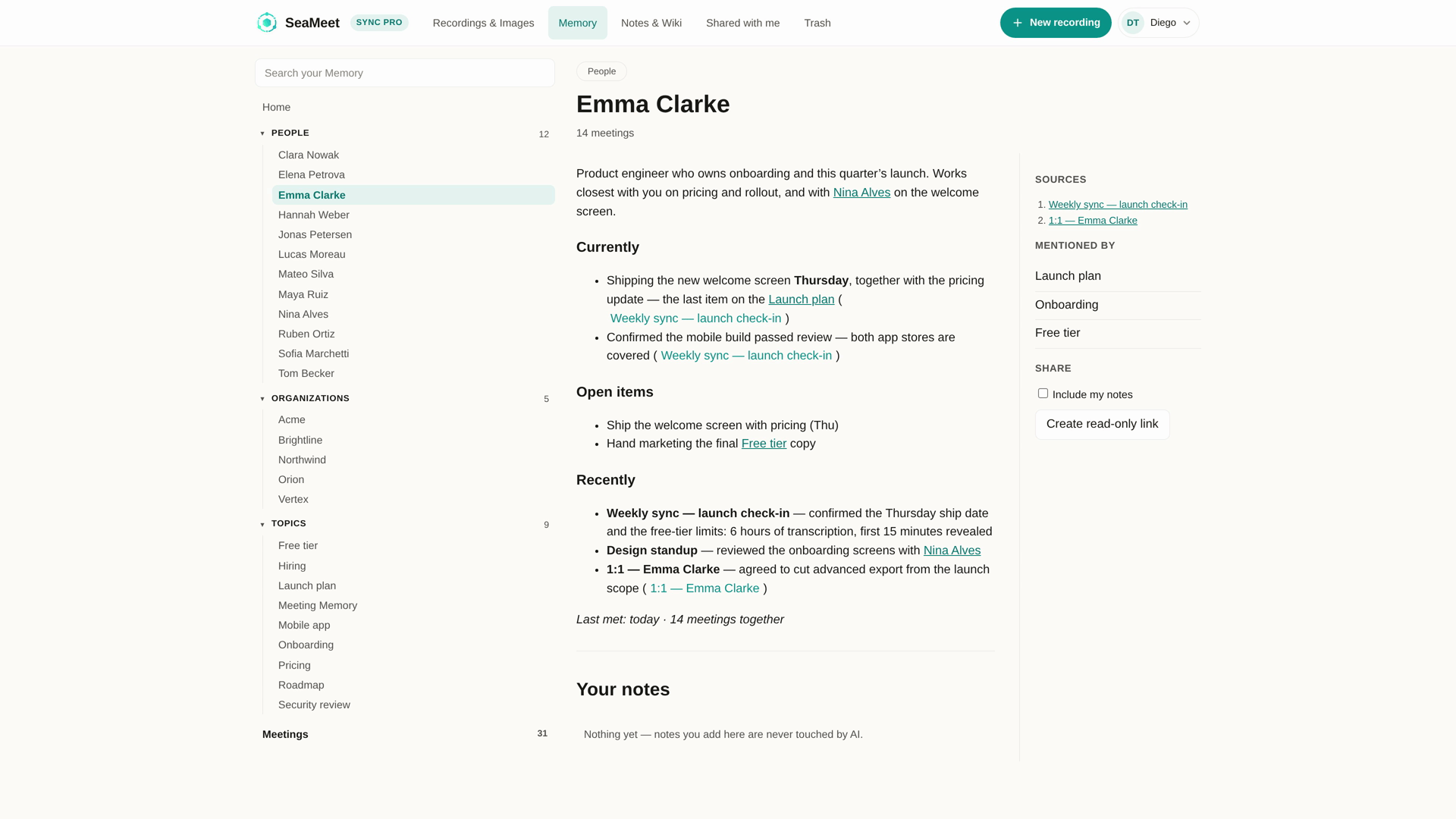
In SeaMeet, every person you meet with accumulates a Memory page. Not a profile you fill in — a running account the meetings write:
- What you discussed, meeting by meeting, newest first.
- What is still open — the promises, the open questions, the items someone said they would check.
- When you last met, and everything the relationship has logged along the way.
The page is about them, not about you — it appears the moment someone shows up in your recordings, and it grows every time they show up again. Open it the morning of the fifth call and you are reading one continuous thread: the thread you would have written if you had an analyst following every conversation.
The page a company gets — and why it knows more
People change jobs, switch roles, hand you off to a colleague. The company page is what survives the handoff. Every meeting that mentioned the organization feeds it, including the calls where nobody from their side was present: the internal debrief after the demo, the pricing discussion in your own team, the partner’s aside about their procurement process. A page per company, assembled from every meeting that mentioned it — which is a strictly larger archive than anyone in the room carries.
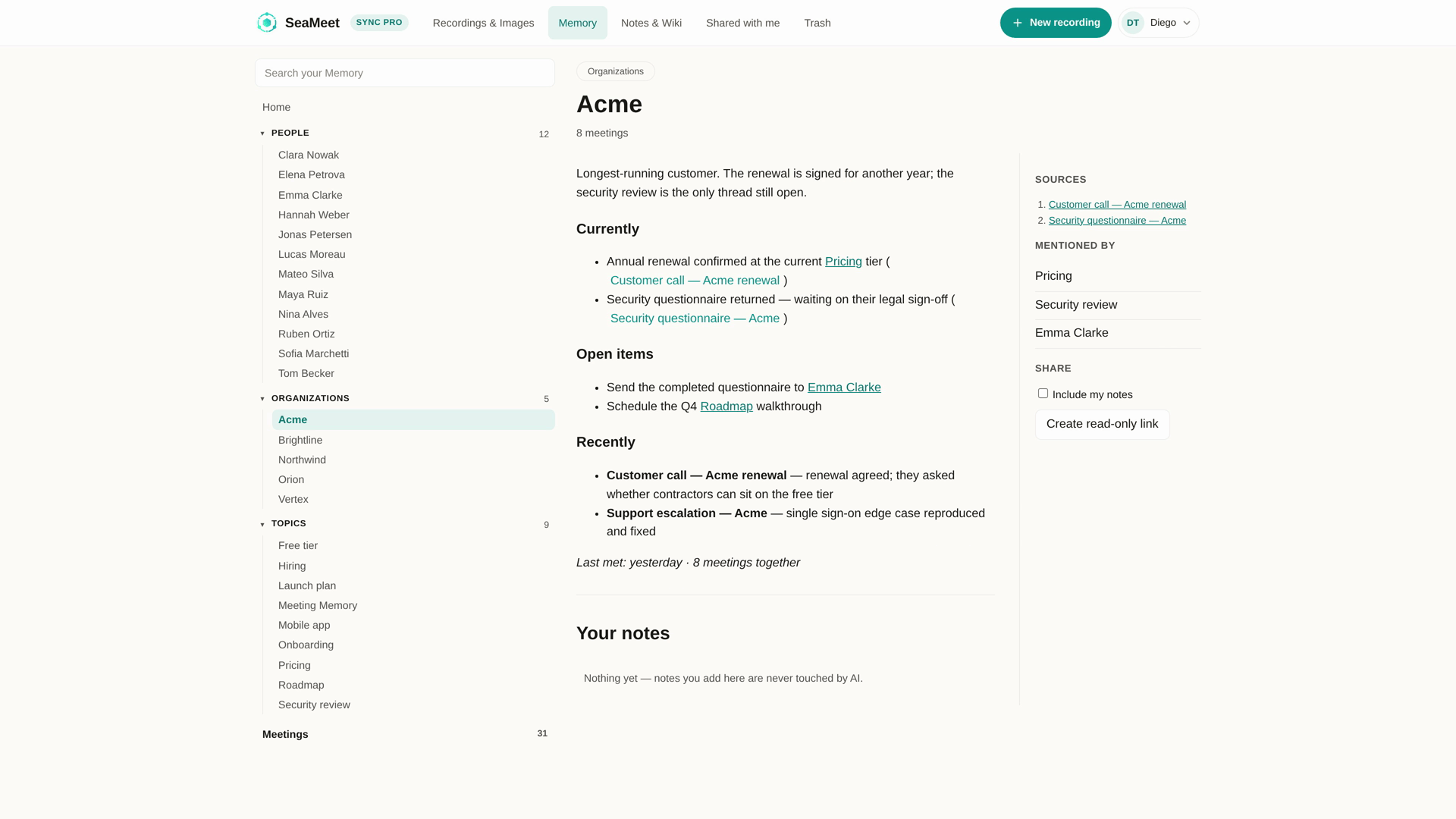
Sales teams feel this first. The account review stops being an archaeology project: the question “what moved with Acme this month?” has a page, and the page has an answer with sources.
Compounding, not accumulating
Storage accumulates — more files, older dates, deeper folders. Memory compounds — each new meeting makes every previous one more useful, because the page between you gets rewritten with the whole story in view.
Concretely, the difference shows up in three places:
- Open items carry forward. The sample someone requested in call two resurfaces on the page before call five — flagged as unresolved, not buried in an old summary.
- Contradictions surface. When the timeline shifts — a budget that was approved in March and re-scoped in June — the page holds both with their dates, instead of quietly overwriting nothing and remembering less.
- Prep time becomes reading time. You stop reconstructing the relationship and start reviewing it. Five meetings in, the page is worth more than any single one of them.
This is the honest version of what note apps mean when they say “memory”: not a chatbot you interrogate, but a document that is already up to date when you open it — a different proposition from the bot-based notetakers most sales teams evaluate first.
What the page reads like
Open a person’s page the morning of a call and it behaves like a brief written by someone who was paying attention all along:
- The story runs newest first. Each entry is a meeting, in order, and each one links back to the recording and transcript it came from — when you need the exact words behind a summary line, the source is one click away, timestamp and all.
- The week’s movement is called out. The home view lists what changed this week, and every row names the meeting that moved it. You skim five lines and know what the relationship did while you were doing something else.
- Open items are visible, not implied. The unresolved things sit on the page as unresolved — nobody has to remember that the sample request from three weeks ago is still outstanding, because the page remembers it mechanically.
- The two zones stay separate. The account SeaMeet maintains sits on top; whatever you write underneath — the read on the room, the thing you would not put in any system — stays yours and stays put.
The experience, in one line: you review the client the way you review your own calendar — a glance, not a project.
Where the pages come from
The pages are fed by recordings, and The recorder works wherever client conversations actually happen: the WhatsApp negotiation at midnight, the formal video review, the phone call, the coffee without a link. Capture happens on your machine — no bot joins, no participant list grows, no invitation is ever sent — so the calls bots structurally cannot reach are exactly the ones this memory eats first. Transcription covers 20+ languages with automatic detection, which matters when a client relationship runs partly in your language and partly in theirs.
Start with one recorded call and the page begins itself — there is nothing to configure, no taxonomy to design, no field mapping to a database.
What stays yours
Two boundaries keep the pages trustworthy. When the AI gets a fact wrong, you select the sentence, write the correction, and it is kept as ground truth — the page rewrites around what you fixed. And every page has a zone that belongs to you alone: your private notes about the client, the things you noticed and chose not to say, stay underneath, untouched by anything automatic.
The pages are also files. Memory syncs as plain markdown into a folder you own, and recordings and transcripts export in standard formats — your client history is not held hostage by a subscription.
Who this is for
- Sales and account management — the fifth-call prep, the account review, the handoff between owners. When a new owner takes over an account, the page is the handover: months of context that would otherwise walk out the door with the person who earned it.
- Recruiting — a page per candidate across every interview, screening and reference call. The second interviewer reads the first interviewer’s page, not their memory of a hallway conversation.
- Agencies and consultants — one page per client company, shared across everyone who touches the account, so the junior who joins in month nine starts where the partner left off.
- Partnerships and procurement — the running record of what was agreed, revised and left open, on both sides of the table.
Anyone whose work is a series of conversations with the same people, which is most jobs that end in “relationship”.
What it costs
The first 15 minutes of any recording open with no signup; the free tier includes six hours of transcription that never expire; unlimited length comes with Sync Pro at $15.99 month-to-month, or $12.99/month on an annual plan.
FAQ
Is this a client meeting notes template?
Templates assume the note is the deliverable — you fill it in, per meeting, forever. This is the opposite trade: the page is the deliverable, and the meetings fill it in for you. A template still helps for what you write yourself in your own zone; the running account above it needs no template.
Is this a CRM?
It is memory, not pipeline. A CRM tracks stages and fields you maintain; these pages hold the conversation itself — what was said, agreed and left open — and maintain themselves. The two stack: plenty of teams keep the CRM for stages and the pages for what actually happened.
When does a page get created?
The first time someone appears in a recorded meeting. No setup step, no contact creation — the appearance in a conversation is the trigger, and every later appearance updates the same page.
What if the AI gets something wrong about a client?
You correct it once. The correction is stored as ground truth and the page rewrites around it, so the fix persists across future updates instead of being regenerated away.
Where does client data actually live?
In files you control. Pages sync as plain markdown to your folder tree; audio and transcripts export in standard formats. Sensitive relationship history stays on your infrastructure, not in a vendor’s database.
Do messaging-app calls really feed the same pages?
They do — that is the point of recording from your side of the glass. LINE, WhatsApp, phone and in-person conversations produce the same transcripts as formal video meetings, so the page reflects the relationship as it actually runs, not just its calendar invitations.
See Meeting Memory
Related articles
Tags
Ready to try SeaMeet?
Join thousands of teams using AI to make their meetings more productive and actionable.
Free: 6 h lifetime transcription · first 15 min revealed