AI Agent
AI Agent
Pytaj o swoje nagrania. Otrzymuj natychmiastowe odpowiedzi od interaktywnego asystenta AI.
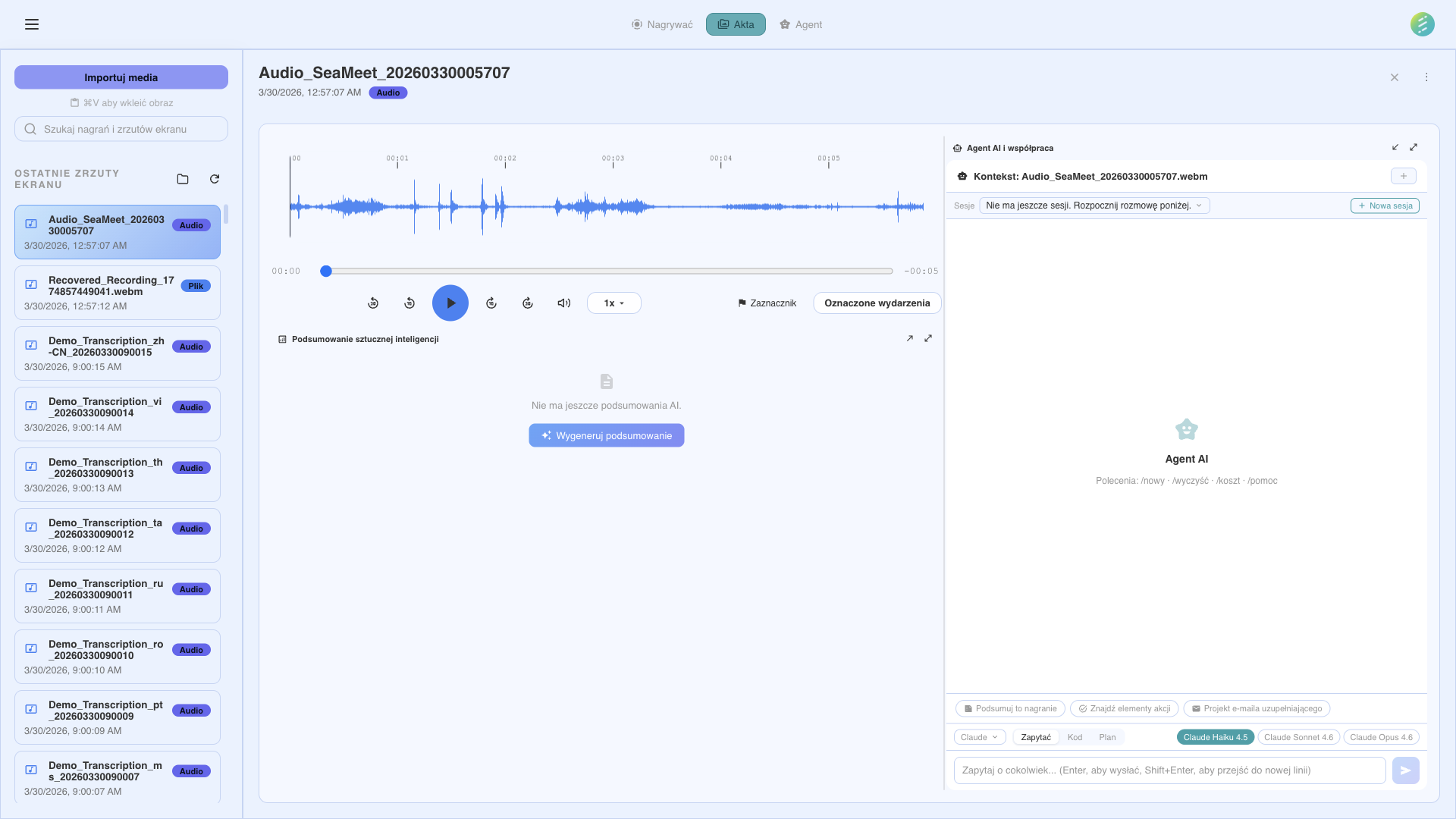
Zadawaj pytania w jezyku naturalnym o swoje nagrania
Wbudowany w aplikacje
Wbudowany Agent AI dziala wewnatrz SeaMeet — bez terminala, bez kart przegladarki, bez przelaczania kontekstu. Otworz panel Agenta i zacznij zadawac pytania o nagrania natychmiast. Odpowiedzi strumieniowane w czasie rzeczywistym przez SSE.
Trzy tryby panelu
Pływajacy
Swobodny panel, ktory mozesz umiescic w dowolnym miejscu na ekranie. Nie przeszkadza podczas pracy.
Zadokowany
Przypiety do boku okna aplikacji. Zmienia rozmiar wraz z glownym obszarem tresci.
Zmaksymalizowany
Panel o pelnej szerokosci do szczegolowych rozmow, dlugich odpowiedzi i wieloetapowych workflow.
Konwersacje swiadome kontekstu
Agent automatycznie odwoluje sie do tresci, nad ktora pracujesz. Widzi otwarte nagranie, pelna transkrypcje, wyodrebnione podsumowania i kazdy zrzut ekranu — bez kopiowania i wklejania.
Otwarte nagranie
Agent wie, ktore nagranie jest aktualnie wybrane i moze odwolywac sie do jego metadanych, czasu trwania i formatu.
Pelna transkrypcja
Kompletna transkrypcja z etykietami mowcow i znacznikami czasu jest dostepna dla agenta do przeszukiwania i cytowania.
Zrzuty ekranu
Pytaj o tresc wizualna — wykresy, slajdy, kod lub dowolny UI przechwycony podczas nagrywania. Agent moze analizowac obrazy bezposrednio.
Wyodrebnione artefakty
Podsumowania, zadania, kluczowe decyzje i rozdzialy sa dostepne dla agenta do pytan nastepnych.
Ty zachowujesz kontrole
Agent pyta przed podjeciem akcji. Gdy chce wykonac zadanie modyfikujace dane lub uzyskujace dostep do zasobow zewnetrznych, widzisz dialog uprawnien. Dla wieloetapowych workflow agent prezentuje plan do Twojej akceptacji przed wykonaniem.
Dialog uprawnien
Zanim agent zapisze pliki, zmodyfikuje nagrania lub zrobi zrzut ekranu, dialog pokazuje dokladnie, co chce zrobic. Zatwierdz lub odrzuc kazda akcje.
Zatwierdzanie planu
Dla zlozonych zadan wieloetapowych agent najpierw prezentuje swoj plan. Przegladaj kazdy krok, a nastepnie zatwierdz wykonanie. Mozesz modyfikowac lub anulowac w dowolnym momencie.
Dwa sposoby rozmowy z nagraniami
Agent AI SeaMeet dziala przez narzedzia AI oparte na CLI. Wybierz dostawce pasujacego do Twojej konfiguracji. Oba maja dostep do Twoich nagran, transkrypcji i wyodrebnionych artefaktow przez lokalny magazyn danych SeaMeet.
Gemini
Modele Google Gemini przez klucz API.
OpenAI
GPT-4o i inne modele OpenAI.
Claude
Modele Anthropic Claude przez API.
DeepSeek
Modele DeepSeek do ekonomicznego rozumowania.
OpenRouter
Dostep do ponad 100 modeli przez OpenRouter.
Amazon Bedrock
Uzywaj Claude i innych modeli przez AWS Bedrock.
Groq
Ultr szybkie wnioskowanie sprzetowe Groq.
Mistral
Modele Mistral AI do zadan wielojezycznych.
Ollama
Uruchamiaj modele lokalne z Ollama. Calkowicie offline.
Together AI
Modele open-source przez Together AI.
xAI (Grok)
Modele xAI Grok.
Cerebras
Szybkie wnioskowanie sprzetowe Cerebras.
Key Server — alternatywa zarzadzanego dostepu
Nie chcesz zarzadzac kluczami API? Opcja Key Server zapewnia zarzadzany dostep do wybranych modeli. Bez kluczy do konfiguracji — wlacz Key Server w ustawieniach i zacznij czatowac. Uzycie podlega limitom uczciwego uzycia.
Zaawansowane: dostawcy CLI
Dla zaawansowanych uzytkownikow preferujacych narzedzia terminalowe, SeaMeet obsluguje agentow AI opartych na CLI. Sa automatycznie wykrywane, gdy ich binaria sa zainstalowane — bez recznej konfiguracji.
Claude Code CLI
Wymagany Claude Pro lub MaxUzyj Claude Code od Anthropic do interakcji z nagraniami przez terminal. Obsluguje gleboka analize, wieloetapowe rozumowanie i wspolpracuje z serwerem MCP SeaMeet.
Codex CLI
OpenAICodex CLI od OpenAI do interakcji w terminalu. Automatycznie wykrywany.
GitHub Copilot CLI
50 darmowych czatow/miesiacUzyj GitHub Copilot w terminalu, aby zadawac pytania o nagrania. Dolaczone do kazdego konta GitHub z dostepem do Copilot. Darmowy poziom obejmuje 50 czatow miesiecznie.
Gemini CLI
GoogleNarzedzie Gemini CLI od Google. Automatycznie wykrywane po zainstalowaniu.
O co mozesz pytac
Agent AI rozumie Twoje transkrypcje, zrzuty ekranu i wyodrebnione dane. Oto typowe przypadki uzycia.
Pytania o tresc spotkania
Zadawaj pytania w jezyku naturalnym o to, co bylo omawiane w nagraniu. "Co klient powiedzial o harmonogramie?" lub "Podsumuj zadania z dzisiejszego standupu."
Analiza zrzutow ekranu
Agent AI moze analizowac zrzuty ekranu zrobione podczas nagran. Pytaj o wykresy, diagramy lub elementy UI, ktore pojawily sie na ekranie podczas spotkania.
Wyszukiwanie w wielu nagraniach
Zadawaj zapytania w wielu nagraniach jednoczesnie. "Ktore spotkania w tym tygodniu wspominaly o budzecie Q3?" lub "Znajdz wszystkie nagrania, gdzie mowiono o wdrozeniu."
Niestandardowa ekstrakcja
Wyjdz poza wbudowane szablony ekstrakcji. Popros agenta o wyciagniecie konkretnych informacji: wzmianki o konkurencji, decyzje techniczne lub cokolwiek istotnego dla Twojego workflow.
Strumieniowanie w czasie rzeczywistym: Wszyscy dostawcy wbudowani uzywaja SSE (Server-Sent Events) do strumieniowania odpowiedzi. Widzisz odpowiedz pojawiajaca sie token po tokenie — bez czekania na pelna odpowiedz.
Not on the desktop app? See the web capability → AI Assistant