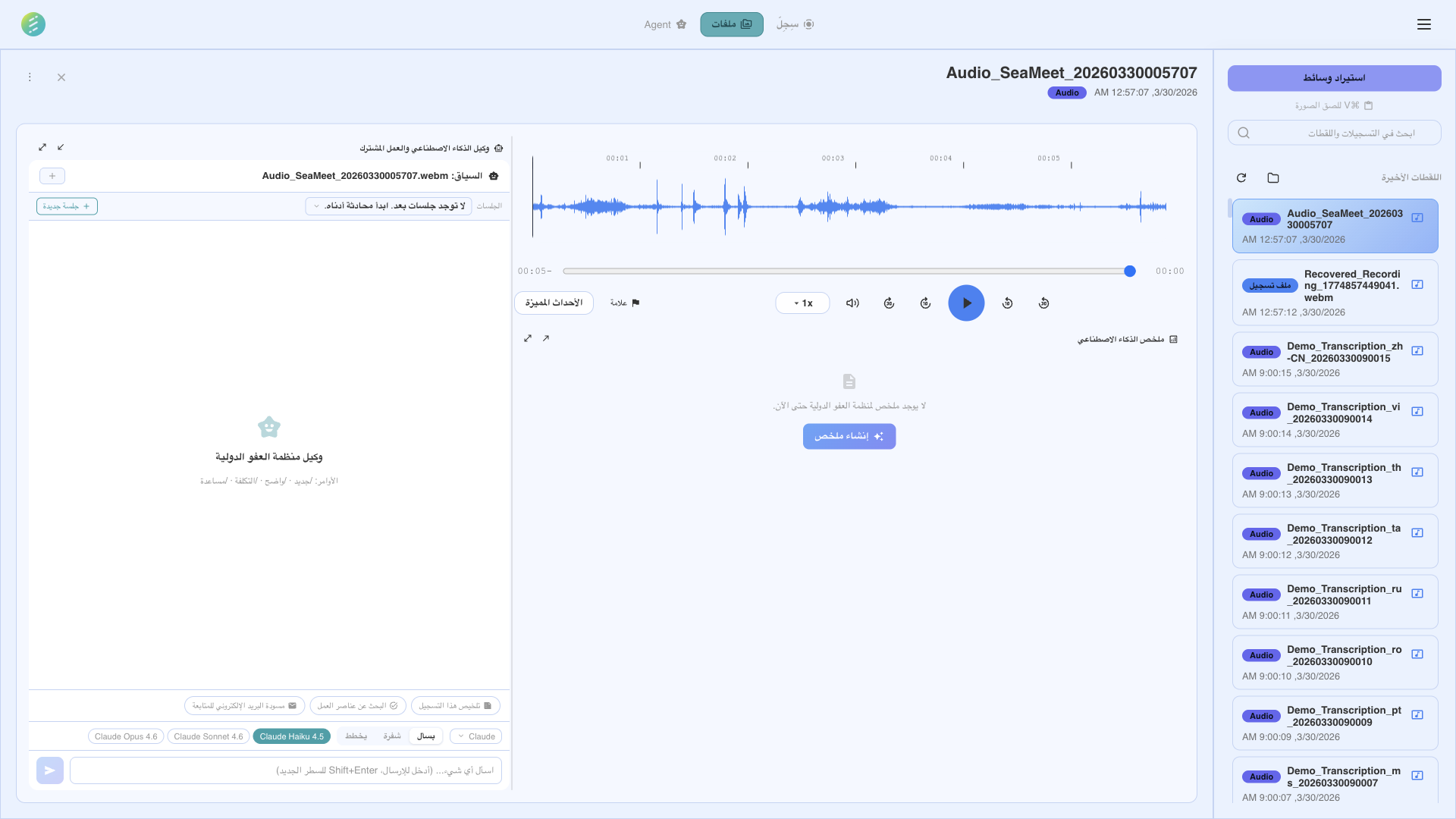
اطرح أسئلة بلغة طبيعية حول تسجيلاتك
Built right into the app
The In-app AI Agent runs inside SeaMeet — no terminal, no browser tabs, no context switching. Open the Agent panel and start asking questions about your recordings immediately. Responses stream in real time via SSE so you see answers as they're generated.
Three panel modes
Floating
Free-floating panel you can position anywhere on screen. Stays out of your way while you work.
Docked
Snapped to the side of the app window. Resizes with the main content area.
Maximized
Full-width panel for detailed conversations, long responses, and multi-step workflows.
Context-aware conversations
The agent automatically references the content you're working with. It can see your open recording, full transcript, extracted summaries, and every screenshot captured during the session — no need to copy and paste.
Open recording
The agent knows which recording is currently selected and can reference its metadata, duration, and format.
Full transcript
The complete transcript with speaker labels and timestamps is available for the agent to search and quote.
Screenshots
Ask about visual content — charts, slides, code, or any UI captured during the recording. The agent can analyze images directly.
Extracted artifacts
Summaries, action items, key decisions, and chapters are all accessible to the agent for follow-up questions.
You stay in control
The agent asks before taking action. When it wants to perform a task that modifies data or accesses external resources, you see a permission dialog. For multi-step workflows, the agent presents a plan for your approval before executing.
Permission dialog
Before the agent writes files, modifies recordings, or takes screenshots, a dialog shows exactly what it wants to do. Approve or deny each action.
Plan approval
For complex multi-step tasks, the agent presents its plan first. Review each step, then approve execution. You can modify or cancel at any point.
طريقتان للتحدث مع تسجيلاتك
وكيل AI في SeaMeet يعمل عبر أدوات AI في سطر الأوامر. اختر المزود المناسب لإعدادك. كلاهما يمكنه الوصول لتسجيلاتك ونصوصك ومخرجاتك المستخلصة عبر مخزن البيانات المحلي لـ SeaMeet.
Gemini
Google Gemini models via API key.
OpenAI
GPT-4o and other OpenAI models.
Claude
Anthropic Claude models via API.
DeepSeek
DeepSeek models for cost-effective reasoning.
OpenRouter
Access 100+ models through OpenRouter.
Amazon Bedrock
Use Claude and other models via AWS Bedrock.
Groq
Ultra-fast inference with Groq hardware.
Mistral
Mistral AI models for multilingual tasks.
Ollama
Run local models with Ollama. Fully offline.
Together AI
Open-source models via Together AI.
xAI (Grok)
xAI Grok models.
Cerebras
Fast inference with Cerebras hardware.
Key Server — managed access alternative
Don't want to manage API keys? The Key Server option provides managed access to selected models. No API keys to configure — just enable Key Server in settings and start chatting. Usage is subject to fair-use limits.
Advanced: CLI providers
For power users who prefer terminal-based tools, SeaMeet also supports CLI-based AI agents. These are auto-detected when their binaries are installed on your system — no manual configuration needed.
Claude Code CLI
يتطلب Claude Pro أو Maxاستخدم Claude Code من Anthropic للتفاعل مع تسجيلاتك عبر الطرفية. يدعم التحليل العميق والاستدلال متعدد الخطوات ويمكنه العمل مع خادم MCP لـ SeaMeet للوصول البرمجي.
Codex CLI
OpenAIOpenAI's Codex CLI for terminal-based interactions. Auto-detected binary.
GitHub Copilot CLI
50 محادثة مجانية شهريًااستخدم GitHub Copilot في الطرفية لطرح أسئلة حول تسجيلاتك. متضمن مع أي حساب GitHub لديه وصول Copilot. المستوى المجاني يتضمن 50 إكمال محادثة شهريًا.
Gemini CLI
GoogleGoogle's Gemini CLI tool. Auto-detected when installed on your system.
ماذا يمكنك أن تسأل
وكيل AI يفهم نصوصك ولقطات الشاشة والبيانات المستخلصة. إليك بعض حالات الاستخدام الشائعة.
أسئلة وأجوبة حول محتوى الاجتماع
اطرح أسئلة بلغة طبيعية حول ما نوقش في تسجيل. "ماذا قال العميل عن الجدول الزمني؟" أو "لخّص عناصر العمل من اجتماع اليوم."
تحليل لقطات الشاشة
وكيل AI يمكنه تحليل لقطات الشاشة الملتقطة أثناء التسجيلات. اسأل عن المخططات والرسوم البيانية أو عناصر الواجهة التي ظهرت على الشاشة أثناء الاجتماع.
البحث عبر التسجيلات
استعلم عبر تسجيلات متعددة في وقت واحد. "أي الاجتماعات هذا الأسبوع ذكرت ميزانية الربع الثالث؟" أو "ابحث عن جميع التسجيلات حيث نوقش النشر."
استخلاص مخصص
تجاوز قوالب الاستخلاص المدمجة. اطلب من الوكيل سحب معلومات محددة: ذكر المنافسين أو القرارات التقنية أو أي شيء يتعلق بسير عملك.
Real-time streaming: All in-app providers use SSE (Server-Sent Events) for streaming responses. You see the answer appear token by token — no waiting for the full response to complete before you can start reading.
Not on the desktop app? See the web capability → AI Assistant